# Vault
> Zero-knowledge password manager with passkey authentication, E2E encryption, and secure vault sharing
## Architecture
Vault is built as a monorepo with multiple packages that work together to deliver a secure, cross-platform password management solution.
### System Overview
```
┌─────────────────────────────────────────────────────────────────────────┐
│ Clients │
├─────────────────┬─────────────────────┬─────────────────────────────────┤
│ Web (React) │ CLI (Node.js) │ Mobile (React Native) │
│ Vite + PWA │ Commander.js │ Expo │
└────────┬────────┴──────────┬──────────┴────────────────┬────────────────┘
│ │ │
│ ┌─────────┴─────────┐ │
│ │ Browser Delegate │ │
│ │ (Passkey Auth) │ │
│ └─────────┬─────────┘ │
│ │ │
└─────────┬─────────┴────────────────────────────┘
│
┌─────────┴─────────┐
│ Cloudflare API │
│ (Hono Workers) │
└─────────┬─────────┘
│
┌─────────┴─────────┐
│ Cloudflare KV │
│ (Encrypted) │
└───────────────────┘
```
### Package Structure
```
packages/
├── api/ # Cloudflare Workers API (Hono)
├── web/ # React Frontend (Vite + Cloudflare Pages)
├── cli/ # Commander.js CLI tool
├── mobile/ # React Native (Expo)
├── cdn/ # Static assets (Cloudflare Worker)
├── docs/ # Documentation (Vocs)
└── shared/ # Shared types, crypto, schemas
```
#### Package Dependencies
| Package | Dependencies | Description |
| ------------- | ------------------------- | -------------------------------- |
| `@pwm/api` | `@pwm/shared` | Backend API server |
| `@pwm/web` | `@pwm/api`, `@pwm/shared` | Web application |
| `@pwm/cli` | `@pwm/api`, `@pwm/shared` | Command-line interface |
| `@pwm/mobile` | `@pwm/api`, `@pwm/shared` | Mobile app |
| `@pwm/shared` | - | Shared utilities (crypto, types) |
### Technology Stack
#### Backend
* **Runtime**: Cloudflare Workers (edge computing)
* **Framework**: [Hono](https://hono.dev/) - lightweight web framework
* **Database**: Cloudflare KV (key-value storage)
* **Authentication**: WebAuthn/Passkeys
#### Web Frontend
* **Framework**: React 18 with TypeScript
* **Build**: Vite + PWA plugin
* **State**: Zustand (client) + TanStack Query (server)
* **Styling**: Tailwind CSS + Radix UI
* **Hosting**: Cloudflare Pages
#### CLI
* **Runtime**: Node.js
* **Framework**: Commander.js
* **Prompts**: Inquirer.js
* **Biometrics**: macOS Touch ID integration
#### Mobile
* **Framework**: React Native with Expo
* **Navigation**: Expo Router
* **Auth**: Expo Local Authentication
### Data Flow
#### 1. User Registration
```
User → Web/Mobile → WebAuthn Registration → API → Store Credential → KV
```
#### 2. Vault Creation
```
User → Enter Master Password → Derive KEK (PBKDF2)
→ Generate Vault Key → Wrap with KEK
→ API → Store Wrapped Key + Empty Vault → KV
```
#### 3. Entry Operations
```
User → Unlock Vault (Master Password/Biometric)
→ Decrypt Vault Key → Decrypt Entries
→ Modify Entry → Re-encrypt → API → KV
```
#### 4. CLI Authentication
```
CLI → Request Session → API → Open Browser
→ User Auth (WebAuthn) → Complete Session
→ CLI Polls → Receives Token
```
### Storage Architecture
#### Cloudflare KV Schema
```
users:{userId} → User profile + WebAuthn credentials
vaults:{userId}:{name} → Encrypted vault data
shared:{ownerId}:{name}:{userId} → Shared vault access
invitations:{id} → Pending share invitations
cli-sessions:{id} → Temporary CLI auth sessions
```
#### Client Storage
| Client | Storage | Data |
| ------ | -------------------- | -------------------------------- |
| Web | localStorage | JWT token, user info |
| Web | Memory only | Master password, vault key |
| Web | IndexedDB | Offline encrypted cache |
| CLI | `~/.pwm/config.json` | Token, user ID |
| CLI | macOS Keychain | Master password (with Touch ID) |
| Mobile | Secure Store | Token, encrypted master password |
### Security Boundaries
#### Never Leaves Client
* Master password
* Plaintext vault key
* Decrypted entries
#### Server-Side Only
* WebAuthn credentials
* Wrapped (encrypted) vault keys
* Encrypted vault data
#### E2E Encrypted
* All vault content
* Entry passwords, notes, URLs
* Shared vault keys (ECDH)
### Deployment Architecture
```
┌──────────────────┐
│ Cloudflare │
│ DNS/CDN │
└────────┬─────────┘
│
┌────────────────────┼────────────────────┐
│ │ │
┌────┴────┐ ┌────┴────┐ ┌────┴────┐
│ Pages │ │ Workers │ │ KV │
│ (Web) │ │ (API) │ │ (DB) │
└─────────┘ └─────────┘ └─────────┘
```
#### Environments
| Environment | Web URL | API URL |
| ----------- | ------------------------- | ------------------------------- |
| Staging | `vault-staging.pages.dev` | `vault-api-staging.workers.dev` |
| Production | `vault.oxc.sh` | `vault-api.workers.dev` |
### Next Steps
* [Security Model](/security) - Zero-knowledge architecture details
* [API Reference](/api) - Complete API documentation
* [Development Guide](/development) - Contributing to Vault
## Features
Vault is packed with features to keep your passwords secure and accessible.
### Security
#### 🔐 Zero-Knowledge Architecture
Your passwords are encrypted **on your device** before being sent to the server. The server only stores encrypted blobs and can never see your plaintext data.
* Master password never transmitted
* Client-side encryption/decryption
* Server stores only encrypted data
#### 🔑 Passkey Authentication
No more passwords to remember. Authenticate using:
* **Face ID** (iPhone, Mac)
* **Touch ID** (Mac)
* **Windows Hello**
* **Security Keys** (YubiKey, etc.)
#### 🔒 Military-Grade Encryption
* **AES-256-GCM** for vault encryption
* **PBKDF2** with 600,000 iterations for key derivation
* **128-bit** random salt per vault
* **96-bit** random IV per encryption operation
#### 👥 Secure Sharing
Share vaults with team members using ECDH key exchange:
* No secrets in invitation URLs
* Perfect forward secrecy with ephemeral keys
* Role-based access (read, write, admin)
* Revokable access anytime
### Entry Types
Store more than just passwords:
| Type | Fields |
| --------------- | -------------------------------------------- |
| **Login** | Name, username, password, URL, notes, tags |
| **Secure Note** | Name, content, tags |
| **Credit Card** | Name, number, expiry, CVV, cardholder, notes |
| **Identity** | Name, email, phone, address, notes |
### Organization
#### 🏷️ Tags
Organize entries with custom tags:
```bash
# Filter by tag in CLI
pwm entry list --tag work
pwm entry list --tag finance --type card
```
#### ⭐ Favorites
Mark frequently used entries as favorites for quick access. Favorites appear at the top of lists.
#### 📁 Multiple Vaults
Create separate vaults for different purposes:
* Personal vault
* Work vault
* Shared team vault
### Import & Export
#### 📥 Import Wizard
Import from popular password managers:
* **NordPass** CSV
* **Chrome** CSV export
* **1Password** CSV export
Features:
* Automatic format detection
* Duplicate detection
* Preview before import
* Field mapping
#### 📤 Export
Export your vault in multiple formats:
```bash
# JSON export
pwm entry export --format json
# Environment file export
pwm entry export --format env --tag aws
```
### Platforms
#### 🌐 Web App (PWA)
Full-featured Progressive Web App:
* Works offline with cached vault
* Installable on any device
* Background sync when online
* Keyboard-first navigation
#### 💻 CLI
Powerful command-line interface:
* **Touch ID** integration on macOS
* **Secret injection** for CI/CD
* Scriptable for automation
* JSON output for tooling
#### 📱 Mobile (Beta)
React Native app with Expo:
* Face ID / Touch ID unlock
* Native iOS and Android
* Offline-capable
* Sharing support
### Productivity
#### ⌨️ Keyboard Shortcuts
Navigate entirely by keyboard:
| Shortcut | Action |
| -------- | ------------------ |
| `↑` `↓` | Navigate list |
| `↵` | Select item |
| `⌘K` | Actions menu |
| `⌘N` | New entry |
| `⌘G` | Password generator |
| `⌘I` | Import |
| `⌘E` | Export |
| `?` | Show all shortcuts |
#### 🔄 Sync
Your vault syncs automatically across all devices:
* Real-time updates
* Conflict resolution
* Version history
* Offline queue
#### 🎲 Password Generator
Generate secure passwords and passphrases:
```bash
# Random password (20 chars)
pwm generate
# Long password with strength indicator
pwm generate --length 32 --strength
# Passphrase (4 words)
pwm generate --passphrase
# Custom passphrase
pwm generate --passphrase --words 6 --separator "-"
```
### Developer Features
#### 🔧 Secret Injection
Inject vault secrets as environment variables:
```bash
# Run command with secrets
pwm use production npm start
# Filter by tag
pwm use dev --tag aws npm run deploy
# Dry run
pwm use staging --dry-run echo "test"
```
#### 📡 API Access
Full REST API for integrations:
* WebAuthn authentication
* Vault CRUD operations
* Sharing management
* TypeScript SDK
#### 🎬 Demo Mode
Record CLI demos with mock data:
```bash
export PWM_DEMO_MODE=true
pwm entry list # Uses mock Touch ID and data
```
import { Callout, Steps } from 'vocs/components'
## Quick Start
Get up and running with Vault in just a few minutes.
### Prerequisites
* **Node.js** 20 or higher
* **pnpm** 9 or higher
### Installation
#### Clone the repository
```bash
git clone https://github.com/zeroexcore/vault.git
cd vault
```
#### Install dependencies
```bash
pnpm install
```
#### Build all packages
```bash
pnpm build
```
#### Start development servers
```bash
# Start both API and Web
pnpm dev
# Or start individually
pnpm --filter @pwm/api dev # API on port 8787
pnpm --filter @pwm/web dev # Web on port 5173
```
### First Login
1. Open [http://localhost:5173](http://localhost:5173)
2. Enter your email address
3. Create a passkey using your device's biometric (Face ID, Touch ID, Windows Hello)
4. Set your master password
5. You're in! 🎉
For UI development without passkeys, use mock mode:
```bash
pnpm dev:mock
```
This bypasses WebAuthn and uses test data.
### CLI Setup
```bash
# Link CLI globally
cd packages/cli
pnpm link --global
# Login (opens browser)
pwm auth login your@email.com
# List entries
pwm entry list
# Add your first entry
pwm entry add
```
### Project Structure
```
vault/
├── packages/
│ ├── api/ # Hono API (Cloudflare Workers)
│ ├── cli/ # Node.js CLI tool
│ ├── docs/ # This documentation
│ ├── mobile/ # React Native app (Expo)
│ ├── shared/ # Shared types, crypto, validation
│ └── web/ # React PWA frontend
├── pnpm-workspace.yaml
└── turbo.json
```
### Available Scripts
| Command | Description |
| ---------------- | ---------------------------------------- |
| `pnpm dev` | Start all dev servers |
| `pnpm dev:mock` | Start with mock auth (no passkey needed) |
| `pnpm build` | Build all packages |
| `pnpm test` | Run all tests |
| `pnpm typecheck` | TypeScript type checking |
| `pnpm lint` | ESLint checks |
### Environment Variables
#### API (`packages/api/.dev.vars`)
```env
RP_NAME=Vault
RP_ID=localhost
RP_ORIGIN=http://localhost:5173
```
#### Web (`packages/web/.env`)
```env
VITE_API_URL=http://localhost:8787
```
### Next Steps
* [Installation Details](/getting-started/installation) - Detailed setup guide
* [Configuration](/getting-started/configuration) - Environment variables and settings
* [CLI Guide](/cli) - Terminal-based password management
* [Web App Guide](/web) - PWA features and shortcuts
## Importing Passwords
Import your existing passwords into Vault.
### Supported Formats
| Manager | Format | File |
| --------- | ------ | ----------------------- |
| NordPass | CSV | `nordpass_export.csv` |
| Chrome | CSV | `Chrome Passwords.csv` |
| 1Password | CSV | `1Password Export.csv` |
| Bitwarden | JSON | `bitwarden_export.json` |
| LastPass | CSV | `lastpass_export.csv` |
### Import Wizard
1. Click **Import** or press `⌘I`
2. Drag & drop your export file
3. Select the format (auto-detected)
4. Preview imported entries
5. Click **Import**
### Export From
#### Chrome
1. Go to `chrome://settings/passwords`
2. Click ⋮ next to "Saved Passwords"
3. Click "Export passwords"
4. Save the CSV file
#### NordPass
1. Open NordPass settings
2. Click "Export Items"
3. Choose CSV format
4. Save the file
#### 1Password
1. Open 1Password
2. File → Export → All Items
3. Choose CSV format
4. Save the file
### CLI Import
```bash
# Auto-detect format
pwm entry import passwords.csv
# Specify format
pwm entry import export.csv --format nordpass
# Preview first
pwm entry import passwords.csv --dry-run
```
### Duplicate Handling
When importing, duplicates are detected by:
* Name
* Username
* URL
Options:
* **Skip** - Don't import duplicates
* **Replace** - Update existing entries
* **Keep Both** - Import as new entries
## Web App
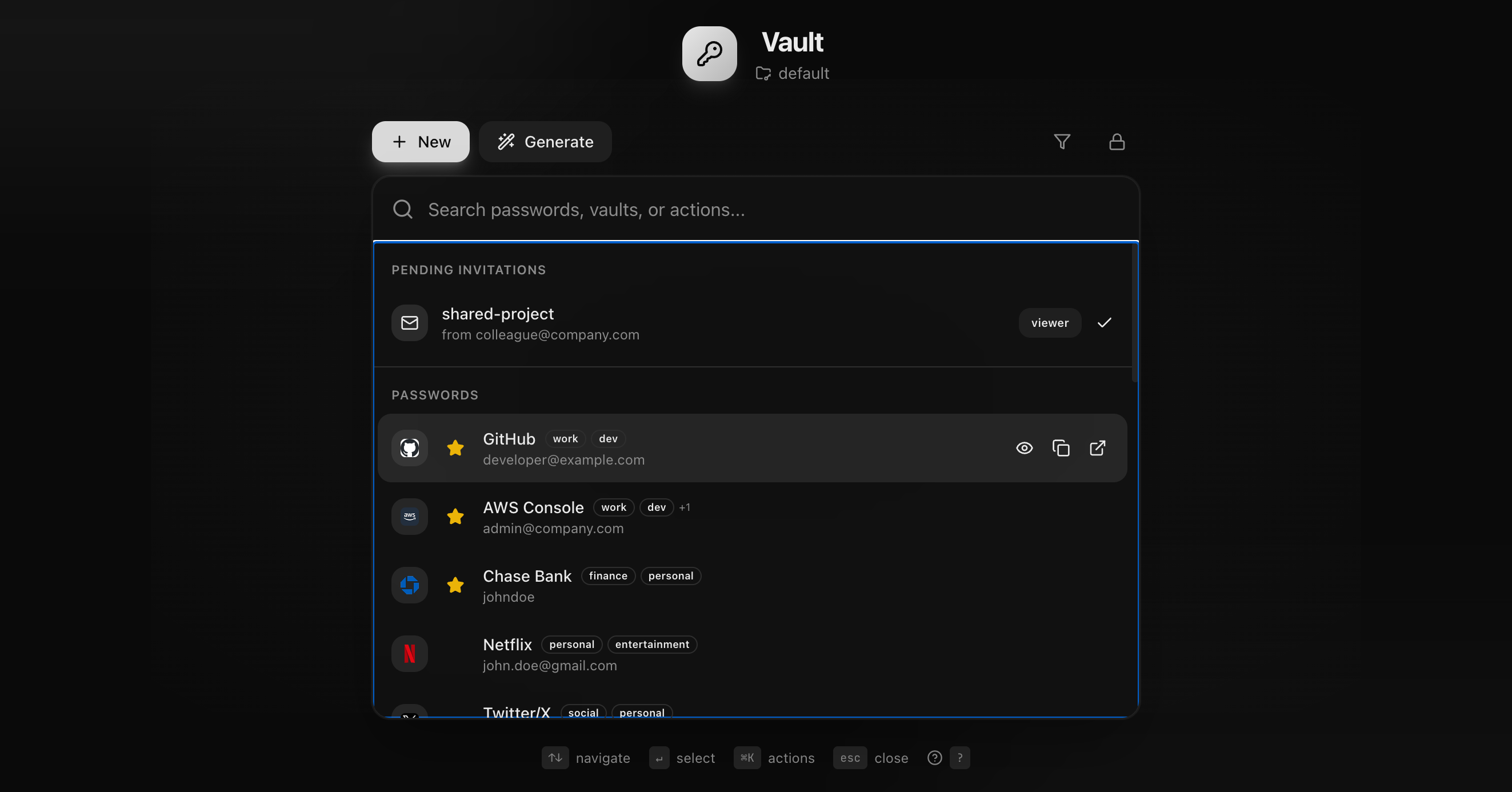
Vault's web application is a full-featured Progressive Web App (PWA) with offline support.
### Features
* **PWA** - Install on any device
* **Offline Mode** - Access vault without internet
* **Keyboard Navigation** - Full keyboard support
* **Responsive** - Works on desktop and mobile
### Screenshots
#### Dashboard
#### Entry Modal

### Getting Started
1. Visit [vault.oxc.sh](https://vault.oxc.sh)
2. Register with your email
3. Create a passkey (Face ID, Touch ID, or security key)
4. Set your master password
5. Start adding entries!
### Guides
* [Keyboard Shortcuts](/web/shortcuts) - Navigate with keyboard
* [PWA & Offline](/web/pwa) - Install and offline mode
* [Importing Passwords](/web/import) - Import from other managers
## PWA & Offline
Vault is a Progressive Web App that works offline.
### Installation
#### Desktop (Chrome/Edge)
1. Visit [vault.oxc.sh](https://vault.oxc.sh)
2. Click the install icon in the address bar
3. Click "Install"
#### iOS Safari
1. Visit [vault.oxc.sh](https://vault.oxc.sh)
2. Tap the Share button
3. Tap "Add to Home Screen"
#### Android Chrome
1. Visit [vault.oxc.sh](https://vault.oxc.sh)
2. Tap the menu (⋮)
3. Tap "Add to Home Screen"
### Offline Mode
Vault caches your encrypted vault locally:
* **View entries** - Browse your vault offline
* **Copy passwords** - Access credentials anytime
* **Create entries** - Add new entries offline
* **Auto-sync** - Changes sync when back online
#### How It Works
1. Vault data is encrypted and cached in IndexedDB
2. Service worker enables offline access
3. Changes are queued and synced automatically
4. Conflict resolution happens on sync
### Sync Status
The sync indicator shows your connection status:
| Icon | Status |
| ---- | ------------------- |
| ✓ | Synced |
| ↻ | Syncing |
| ⚠ | Offline (will sync) |
| ✕ | Sync error |
### Cache Management
Clear local cache in Settings > Storage:
* Clear vault cache
* Clear all data
* Force re-sync
## Keyboard Shortcuts
Vault is designed for keyboard-first navigation.
### Global Shortcuts
| Shortcut | Action |
| -------- | -------------------- |
| `⌘K` | Open command palette |
| `⌘N` | New entry |
| `⌘G` | Password generator |
| `⌘I` | Import passwords |
| `⌘E` | Export vault |
| `⌘,` | Settings |
| `?` | Show all shortcuts |
### Navigation
| Shortcut | Action |
| ----------- | ---------------------- |
| `↑` `↓` | Navigate list |
| `↵` | Select / Open |
| `Escape` | Close modal / Deselect |
| `Tab` | Next field |
| `Shift+Tab` | Previous field |
### Entry List
| Shortcut | Action |
| -------- | ----------------------- |
| `/` | Focus search |
| `f` | Toggle favorites filter |
| `t` | Focus tag filter |
| `↵` | Open selected entry |
| `⌫` | Delete selected entry |
### Entry Modal
| Shortcut | Action |
| -------- | ------------- |
| `⌘C` | Copy password |
| `⌘S` | Save changes |
| `⌘⇧C` | Copy username |
| `Escape` | Close modal |
### Command Palette
Press `⌘K` to open the command palette:
```
> Add new entry
> Generate password
> Search entries
> Import passwords
> Export vault
> Settings
> Logout
```
Type to filter commands.
## Encryption
Vault uses industry-standard encryption to protect your passwords. All cryptographic operations use the Web Crypto API.
### Encryption Flow
```
Master Password
│
▼
┌──────────────┐
│ PBKDF2 │ ← Salt (random, stored on server)
│ (600,000 │
│ iterations) │
└──────────────┘
│
▼
Key Encryption Key (KEK)
│
▼
┌──────────────┐
│ AES-GCM │ ← Wraps/unwraps the Vault Key
│ Unwrap │
└──────────────┘
│
▼
Vault Key (random 256-bit)
│
▼
┌──────────────┐
│ AES-GCM │ ← Encrypts/decrypts vault entries
│ Decrypt │
└──────────────┘
│
▼
Plaintext Entries
```
### Key Derivation (PBKDF2)
Your master password is converted to a Key Encryption Key (KEK) using PBKDF2:
```typescript
const kek = await crypto.subtle.deriveKey(
{
name: "PBKDF2",
salt: salt, // 16 bytes, random, stored on server
iterations: 600000, // OWASP recommended minimum
hash: "SHA-256"
},
passwordKey,
{ name: "AES-GCM", length: 256 },
false,
["wrapKey", "unwrapKey"]
);
```
#### Why PBKDF2?
* **Browser-native**: Web Crypto API support
* **Configurable iterations**: Can increase over time
* **Proven security**: Well-studied algorithm
* **Memory-hard alternative**: Argon2 considered for future
#### Iteration Count
| Year | OWASP Recommendation |
| ------ | ----------------------- |
| 2023 | 600,000 |
| Future | Increases with hardware |
### Vault Key
Each vault has a unique 256-bit key generated randomly:
```typescript
const vaultKey = await crypto.subtle.generateKey(
{ name: "AES-GCM", length: 256 },
true, // Extractable for wrapping
["encrypt", "decrypt"]
);
```
#### Key Wrapping
The vault key is wrapped (encrypted) with the KEK before storage:
```typescript
// Wrap vault key for storage
const wrappedKey = await crypto.subtle.wrapKey(
"raw",
vaultKey,
kek,
{ name: "AES-GCM", iv: iv }
);
// Unwrap vault key for use
const vaultKey = await crypto.subtle.unwrapKey(
"raw",
wrappedKey,
kek,
{ name: "AES-GCM", iv: iv },
{ name: "AES-GCM", length: 256 },
false,
["encrypt", "decrypt"]
);
```
### Vault Encryption (AES-GCM)
Vault entries are encrypted with AES-256-GCM:
```typescript
// Encrypt
const encrypted = await crypto.subtle.encrypt(
{ name: "AES-GCM", iv: iv },
vaultKey,
encodedData
);
// Decrypt
const decrypted = await crypto.subtle.decrypt(
{ name: "AES-GCM", iv: iv },
vaultKey,
encryptedData
);
```
#### Why AES-GCM?
* **Authenticated**: Built-in integrity check
* **Fast**: Hardware acceleration (AES-NI)
* **Secure**: No known practical attacks
* **Standard**: NIST approved, widely used
### Data Format
#### Encrypted Vault (stored on server)
```typescript
{
encryptedData: string, // Base64(AES-GCM(JSON(entries)))
iv: string, // Base64(12 random bytes)
wrappedVaultKey: string, // Base64(AES-GCM(vaultKey))
vaultKeyIv: string, // Base64(12 random bytes)
vaultKeySalt: string, // Base64(16 random bytes)
version: number
}
```
#### Decrypted Entry (client only)
```typescript
{
id: string,
type: "login" | "note" | "card" | "identity",
name: string,
username?: string,
password: string,
url?: string,
notes?: string,
tags: string[],
favorite: boolean,
createdAt: string,
updatedAt: string
}
```
### IV (Initialization Vector)
Every encryption operation uses a fresh random IV:
```typescript
const iv = crypto.getRandomValues(new Uint8Array(12));
```
**Important**: Never reuse an IV with the same key. Vault generates a new IV for every save operation.
### Security Properties
#### Confidentiality
* 256-bit AES encryption
* Keys never leave client unencrypted
* Server cannot read vault contents
#### Integrity
* GCM mode provides authentication
* Tampering detected on decryption
* Version field prevents replay attacks
#### Forward Secrecy
* Changing master password re-encrypts vault key
* Old wrapped keys cannot decrypt new data
* Compromised KEK only affects current wrapping
### Code Reference
Encryption utilities are in `@pwm/shared`:
```typescript
import {
// Key derivation
deriveKeyFromPassword,
// Vault key operations
generateVaultKey,
wrapVaultKey,
unwrapVaultKey,
// Vault encryption
encryptWithVaultKey,
decryptWithVaultKey
} from "@pwm/shared";
```
### Related
* [Zero-Knowledge Security](/security) - Security overview
* [Passkeys](/security/passkeys) - Authentication security
* [Vaults API](/api/vaults) - How encrypted data is stored
## Zero-Knowledge Security
Vault implements a zero-knowledge architecture where your data remains encrypted end-to-end. The server never has access to your plaintext passwords.
### What is Zero-Knowledge?
Zero-knowledge means the server:
* **Never sees** your master password
* **Never sees** your vault key
* **Never sees** your decrypted entries
* **Cannot decrypt** your data even if compromised
```
┌─────────────────────────────────────────────────────────────────┐
│ Your Device │
│ ┌──────────┐ ┌──────────┐ ┌──────────┐ │
│ │ Master │──▶│ Derive │──▶│ Decrypt │──▶ Plaintext │
│ │ Password │ │ Keys │ │ Entries │ Passwords │
│ └──────────┘ └──────────┘ └──────────┘ │
└─────────────────────────────────────────────────────────────────┘
│ │
│ Never transmitted │ Never transmitted
▼ ▼
┌─────────────────────────────────────────────────────────────────┐
│ Vault Server │
│ ┌──────────┐ ┌──────────┐ ┌──────────┐ │
│ │ Wrapped │ │ Encrypted │ │ WebAuthn │ │
│ │ Vault Key│ │ Vault │ │ Credential│ │
│ └──────────┘ └──────────┘ └──────────┘ │
└─────────────────────────────────────────────────────────────────┘
```
### Security Model
#### Client-Side Encryption
All encryption and decryption happens on your device:
1. **Master Password** → Never leaves your device
2. **Key Derivation** → PBKDF2 runs locally
3. **Vault Encryption** → AES-GCM encryption runs locally
4. **Vault Decryption** → Only your device can decrypt
#### What the Server Stores
| Data | Encryption | Server Access |
| ------------------- | ---------- | --------------------------- |
| Email | Plaintext | ✅ Required for login |
| WebAuthn Credential | Signed | ✅ Required for passkey auth |
| Wrapped Vault Key | Encrypted | ❌ Cannot decrypt |
| Encrypted Vault | AES-GCM | ❌ Cannot decrypt |
| PBKDF2 Salt | Plaintext | ⚠️ Useless without password |
#### What Stays Local
| Data | Storage | Persisted |
| ----------------- | ----------- | --------- |
| Master Password | Memory only | Never |
| Vault Key | Memory only | Never |
| Decrypted Entries | Memory only | Never |
| Derived KEK | Memory only | Never |
### Threat Model
#### What We Protect Against
✅ **Server Breach** - Attacker gets database dump
* All vault data is encrypted
* No master passwords stored
* WebAuthn credentials require physical authenticator
✅ **Man-in-the-Middle** - Attacker intercepts traffic
* HTTPS/TLS encryption in transit
* Data already encrypted before transmission
* WebAuthn prevents phishing
✅ **Malicious Server** - Server operator turns evil
* Cannot decrypt vault data
* Cannot derive master passwords from salts
* Cannot forge WebAuthn authentication
#### What Requires User Vigilance
⚠️ **Weak Master Password** - Brute-force attack on wrapped key
* Use strong, unique master password
* Salt + PBKDF2 provides some protection
⚠️ **Compromised Device** - Malware on your machine
* Master password exposed in memory
* Use device security features
* Enable biometric unlock to avoid typing password
⚠️ **Social Engineering** - Tricked into revealing credentials
* Never share your master password
* Verify you're on the real Vault domain
### Cryptographic Primitives
| Purpose | Algorithm | Key Size |
| ---------------- | -------------- | -------- |
| Key Derivation | PBKDF2-SHA256 | 256-bit |
| Vault Encryption | AES-256-GCM | 256-bit |
| Key Wrapping | AES-256-GCM | 256-bit |
| Authentication | WebAuthn ECDSA | P-256 |
| Sharing | ECDH P-256 | 256-bit |
### Security Sections
#### [Encryption](/security/encryption)
How vault encryption works with AES-GCM and key derivation.
#### [Passkeys](/security/passkeys)
WebAuthn/Passkey authentication and why it's phishing-resistant.
#### [ECDH Sharing](/security/sharing)
How vault sharing maintains zero-knowledge properties.
### Audit Status
| Component | Status | Notes |
| -------------- | ---------------- | ------------------------------ |
| Crypto Library | ✅ Web Crypto API | Browser-native, FIPS-validated |
| Server Code | 🔄 Pending | Community review welcome |
| Client Code | 🔄 Pending | Open source on GitHub |
### Best Practices
#### Master Password
* Use 12+ characters with mixed case, numbers, symbols
* Or use a 5+ word passphrase
* Never reuse across services
* Consider writing down and storing securely
#### Biometrics
* Enable Touch ID / Face ID when available
* Reduces keyboard exposure of master password
* Still requires master password as fallback
#### Backup
* Test that you can unlock with master password
* Store master password backup securely offline
* Recovery without master password is **impossible**
### Related
* [Encryption Details](/security/encryption)
* [Passkey Security](/security/passkeys)
* [Sharing Security](/security/sharing)
* [Architecture](/architecture)
## Passkeys
Vault uses passkeys (WebAuthn) for authentication, providing phishing-resistant, passwordless login.
### What Are Passkeys?
Passkeys are cryptographic credentials that replace passwords:
* **Phishing-resistant**: Bound to specific domains
* **No shared secrets**: Public key cryptography
* **Biometric**: Unlock with fingerprint or face
* **Cross-device**: Sync across your devices
```
┌─────────────────┐ ┌─────────────────┐ ┌─────────────────┐
│ Your Device │ │ Authenticator │ │ Vault Server │
│ │ │ (TPM/Secure │ │ │
│ Browser/App │◀───▶│ Enclave) │◀───▶│ Stores Public │
│ │ │ │ │ Key Only │
│ Triggers Auth │ │ Signs Challenge│ │ Verifies Sig │
└─────────────────┘ └─────────────────┘ └─────────────────┘
```
### Why Passkeys?
#### vs. Passwords
| Feature | Passwords | Passkeys |
| ------------- | ---------- | --------------- |
| Phishing | Vulnerable | Resistant |
| Reuse attacks | Vulnerable | Immune |
| Brute force | Vulnerable | Immune |
| Data breaches | Exposed | Only public key |
| User friction | High | Low |
#### vs. 2FA
| Feature | TOTP/SMS | Passkeys |
| ----------- | ---------------- | ---------- |
| Phishing | Vulnerable | Resistant |
| SIM swap | Vulnerable (SMS) | Immune |
| Code entry | Required | Not needed |
| Single step | No | Yes |
### How It Works
#### Registration
1. Server generates random challenge
2. Authenticator creates key pair
3. Private key stored in secure hardware
4. Public key sent to server
```typescript
// Server generates options
const options = await generateRegistrationOptions({
rpName: "Vault",
rpID: "vault.oxc.sh",
userID: userId,
userName: email,
authenticatorSelection: {
residentKey: "required",
userVerification: "required"
}
});
// Client creates credential
const credential = await navigator.credentials.create({
publicKey: options
});
// Server stores public key
await storeCredential(userId, credential);
```
#### Authentication
1. Server generates random challenge
2. Authenticator signs challenge with private key
3. User verifies with biometric
4. Server verifies signature with public key
```typescript
// Server generates options
const options = await generateAuthenticationOptions({
rpID: "vault.oxc.sh",
allowCredentials: userCredentials,
userVerification: "required"
});
// Client signs challenge
const assertion = await navigator.credentials.get({
publicKey: options
});
// Server verifies signature
const verified = await verifyAuthenticationResponse({
response: assertion,
expectedChallenge: challenge,
expectedOrigin: "https://vault.oxc.sh",
expectedRPID: "vault.oxc.sh",
credential: storedCredential
});
```
### Phishing Resistance
Passkeys are bound to the relying party (RP) origin:
```
✅ https://vault.oxc.sh → Passkey works
❌ https://vault.oxc.sh.fake → Passkey refuses to sign
❌ https://voult.oxc.sh → Passkey refuses to sign
```
The authenticator checks:
1. **Origin**: Must match registered domain
2. **RP ID**: Must match registered RP ID
3. **TLS**: Must be HTTPS
**Even if you're tricked**, your passkey won't authenticate to a fake site.
### User Verification
Vault requires user verification for every authentication:
| Method | Platform |
| ------------- | ------------- |
| Touch ID | macOS, iOS |
| Face ID | iOS |
| Windows Hello | Windows |
| Fingerprint | Android |
| PIN | All platforms |
This ensures someone with physical access to your device still needs biometric or PIN.
### Supported Authenticators
#### Platform Authenticators (Built-in)
| Platform | Authenticator | Sync |
| -------- | ----------------------- | ----------------- |
| Apple | iCloud Keychain | iCloud |
| Google | Google Password Manager | Google Account |
| Windows | Windows Hello | Microsoft Account |
#### Roaming Authenticators (External)
| Device | Type |
| --------- | ------- |
| YubiKey | USB/NFC |
| Titan Key | USB/NFC |
| Feitian | USB/NFC |
### PRF Extension
Vault uses the WebAuthn PRF extension to derive vault encryption keys:
```typescript
const credential = await navigator.credentials.get({
publicKey: {
...options,
extensions: {
prf: {
eval: {
first: saltBytes
}
}
}
}
});
// PRF output used to derive vault key
const prfOutput = credential.getClientExtensionResults().prf?.results?.first;
```
**Benefits:**
* Hardware-bound encryption key
* No master password needed (if PRF supported)
* Key never leaves secure hardware
**Limitations:**
* Not all authenticators support PRF
* Falls back to master password if unavailable
### CLI Authentication
The CLI can't perform WebAuthn directly (no browser context), so it uses browser delegation:
1. CLI creates auth session on server
2. CLI opens browser with session ID
3. User completes passkey auth in browser
4. Browser completes session
5. CLI polls and receives token
See [CLI Authentication](/cli/authentication) for details.
### Security Considerations
#### Lost Authenticator
If you lose your passkey authenticator:
1. Platform passkeys sync automatically
2. Register backup authenticator recommended
3. Account recovery requires identity verification
#### Compromised Authenticator
If your authenticator is compromised:
1. Revoke credential in Vault settings
2. Re-register with new authenticator
3. No password to change
#### Platform Security
Passkey security depends on:
* Device lock (PIN/biometric)
* Platform integrity
* Secure enclave implementation
### Browser Support
| Browser | Platform Passkeys | Roaming (USB) |
| ------------ | ----------------- | ------------- |
| Chrome 108+ | ✅ | ✅ |
| Safari 16+ | ✅ | ✅ |
| Firefox 122+ | ✅ | ✅ |
| Edge 108+ | ✅ | ✅ |
### Related
* [Zero-Knowledge Security](/security) - Overall security model
* [CLI Authentication](/cli/authentication) - CLI passkey flow
* [Authentication API](/api/auth) - WebAuthn endpoints
## ECDH Vault Sharing
Vault sharing uses Elliptic-curve Diffie-Hellman (ECDH) key exchange to securely transfer vault keys without the server ever seeing them.
### Overview
When Alice shares a vault with Bob:
1. Alice and Bob each have an ECDH key pair
2. Alice derives a shared secret using her private key + Bob's public key
3. Alice encrypts the vault key with this shared secret
4. Bob derives the same shared secret using his private key + Alice's public key
5. Bob decrypts the vault key with the shared secret
**The server only sees encrypted keys** — it cannot derive the shared secret.
### ECDH Key Exchange
#### The Math
```
Alice: private_a, public_A = private_a × G
Bob: private_b, public_B = private_b × G
Shared Secret (Alice computes): private_a × public_B = private_a × private_b × G
Shared Secret (Bob computes): private_b × public_A = private_b × private_a × G
Both arrive at: private_a × private_b × G
```
#### Implementation
```typescript
// Generate ECDH key pair
const keyPair = await crypto.subtle.generateKey(
{ name: "ECDH", namedCurve: "P-256" },
true,
["deriveKey"]
);
// Derive shared secret
const sharedSecret = await crypto.subtle.deriveKey(
{
name: "ECDH",
public: otherPartyPublicKey
},
myPrivateKey,
{ name: "AES-GCM", length: 256 },
false,
["wrapKey", "unwrapKey"]
);
```
### Sharing Flow
#### Step 1: Key Generation (First-time setup)
Each user generates an ECDH key pair when they first create an account:
```typescript
// Generate key pair
const keyPair = await crypto.subtle.generateKey(
{ name: "ECDH", namedCurve: "P-256" },
true,
["deriveKey"]
);
// Export public key for server storage
const publicKey = await crypto.subtle.exportKey("spki", keyPair.publicKey);
// Encrypt private key with vault key for backup
const encryptedPrivateKey = await encryptWithVaultKey(
await crypto.subtle.exportKey("pkcs8", keyPair.privateKey),
vaultKey
);
// Store on server
await api.auth.sharingKeys.$post({
json: {
publicKey: base64Encode(publicKey),
encryptedPrivateKey: base64Encode(encryptedPrivateKey)
}
});
```
#### Step 2: Create Invitation (Sender)
```typescript
// 1. Get recipient's public key
const { publicKey: recipientPublicKeyRaw } = await api.auth.user[":email"]["public-key"].$get({
param: { email: recipientEmail }
});
// 2. Import recipient's public key
const recipientPublicKey = await crypto.subtle.importKey(
"spki",
base64Decode(recipientPublicKeyRaw),
{ name: "ECDH", namedCurve: "P-256" },
false,
[]
);
// 3. Derive shared secret
const sharedSecret = await crypto.subtle.deriveKey(
{ name: "ECDH", public: recipientPublicKey },
myPrivateKey,
{ name: "AES-GCM", length: 256 },
false,
["wrapKey"]
);
// 4. Wrap vault key with shared secret
const iv = crypto.getRandomValues(new Uint8Array(12));
const wrappedVaultKey = await crypto.subtle.wrapKey(
"raw",
vaultKey,
sharedSecret,
{ name: "AES-GCM", iv }
);
// 5. Create invitation
await api.vault[":name"].share.$post({
param: { name: vaultName },
json: {
email: recipientEmail,
role: "write",
wrappedKeyForRecipient: base64Encode(iv) + "." + base64Encode(wrappedVaultKey)
}
});
```
#### Step 3: Accept Invitation (Recipient)
```typescript
// 1. Get invitation details
const invitation = await api.invitations[":id"].$get({
param: { id: invitationId }
});
// 2. Get sender's public key
const { publicKey: senderPublicKeyRaw } = await api.auth.user[":email"]["public-key"].$get({
param: { email: invitation.ownerEmail }
});
// 3. Import sender's public key
const senderPublicKey = await crypto.subtle.importKey(
"spki",
base64Decode(senderPublicKeyRaw),
{ name: "ECDH", namedCurve: "P-256" },
false,
[]
);
// 4. Derive same shared secret
const sharedSecret = await crypto.subtle.deriveKey(
{ name: "ECDH", public: senderPublicKey },
myPrivateKey,
{ name: "AES-GCM", length: 256 },
false,
["unwrapKey"]
);
// 5. Unwrap vault key
const [ivB64, wrappedKeyB64] = invitation.wrappedKey.split(".");
const vaultKey = await crypto.subtle.unwrapKey(
"raw",
base64Decode(wrappedKeyB64),
sharedSecret,
{ name: "AES-GCM", iv: base64Decode(ivB64) },
{ name: "AES-GCM", length: 256 },
false,
["encrypt", "decrypt"]
);
// 6. Accept invitation
await api.invitations[":id"].accept.$post({
param: { id: invitationId }
});
// Now can decrypt shared vault!
```
### Security Properties
#### Zero-Knowledge
The server sees:
* ✅ Public keys (cannot derive shared secret)
* ✅ Wrapped vault key (cannot decrypt without shared secret)
* ❌ Private keys (encrypted with user's vault key)
* ❌ Shared secret (never transmitted)
* ❌ Plaintext vault key
#### Forward Secrecy
* Each sharing relationship uses a unique shared secret
* Compromising one shared secret doesn't expose others
* Revoking access doesn't expose past communications
#### Key Compromise
If Alice's ECDH private key is compromised:
* Attacker can derive shared secrets with anyone Alice has shared with
* Attacker can decrypt vault keys shared with Alice
* **Mitigation**: Private key encrypted with vault key, which requires master password
### Access Control
#### Roles
| Role | Read | Write | Delete | Re-share |
| ------- | ---- | ----- | ------ | -------- |
| `read` | ✅ | ❌ | ❌ | ❌ |
| `write` | ✅ | ✅ | ❌ | ❌ |
| `admin` | ✅ | ✅ | ✅ | ✅ |
#### Revocation
Revoking access:
1. Owner calls revoke endpoint
2. Server removes recipient's access record
3. Recipient can no longer fetch vault data
**Note**: Revocation doesn't re-encrypt. If recipient had access, they may have copied data.
### Cryptographic Details
#### Curve
* **P-256 (secp256r1)**: NIST standard curve
* **Key size**: 256-bit
* **Security level**: \~128-bit
#### Key Derivation
ECDH raw shared secret is passed through HKDF internally by Web Crypto API when using `deriveKey`.
#### Encryption
Wrapped keys use AES-256-GCM:
* **Key**: Derived from ECDH
* **IV**: Random 12 bytes per wrap
* **Tag**: 128-bit authentication tag
### Code Reference
Sharing utilities in `@pwm/shared`:
```typescript
import {
generateSharingKeyPair,
deriveSharedSecret,
wrapKeyForRecipient,
unwrapKeyFromSender
} from "@pwm/shared";
```
### Related
* [Zero-Knowledge Security](/security) - Overall security model
* [Vault Sharing (CLI)](/cli/sharing) - CLI sharing commands
* [Sharing API](/api/sharing) - API endpoints
## Configuration
Configure Vault for development and production environments.
### API Configuration
Create `packages/api/.dev.vars`:
```env
RP_NAME=Vault
RP_ID=localhost
RP_ORIGIN=http://localhost:5173
```
| Variable | Description | Default |
| ----------- | ------------------------------- | ----------------------- |
| `RP_NAME` | Relying Party name for WebAuthn | `Vault` |
| `RP_ID` | Relying Party ID (domain) | `localhost` |
| `RP_ORIGIN` | Allowed origin for WebAuthn | `http://localhost:5173` |
### Web Configuration
Create `packages/web/.env`:
```env
VITE_API_URL=http://localhost:8787
```
| Variable | Description | Default |
| -------------- | -------------- | ----------------------- |
| `VITE_API_URL` | API server URL | `http://localhost:8787` |
### Production Configuration
For production deployment on Cloudflare:
#### API (Workers)
Set these in your Cloudflare dashboard or `wrangler.toml`:
```env
RP_NAME=Vault
RP_ID=vault.oxc.sh
RP_ORIGIN=https://vault.oxc.sh
```
#### Web (Pages)
```env
VITE_API_URL=https://vault-api.oxc.sh
```
### CLI Configuration
The CLI stores configuration in `~/.pwm/config.json`:
```json
{
"apiUrl": "https://vault-api.oxc.sh",
"token": "...",
"userId": "...",
"email": "user@example.com"
}
```
Override the API URL:
```bash
export PWM_API_URL=http://localhost:8787
pwm entry list
```
## Installation
Detailed installation instructions for all platforms.
### Prerequisites
* **Node.js** 20.x or higher
* **pnpm** 9.x or higher
```bash
# Check versions
node --version # Should be v20.x or higher
pnpm --version # Should be v9.x or higher
```
### Clone Repository
```bash
git clone https://github.com/zeroexcore/vault.git
cd vault
```
### Install Dependencies
```bash
pnpm install
```
### Build All Packages
```bash
pnpm build
```
This builds:
* `@pwm/shared` - Shared utilities
* `@pwm/api` - API server
* `@pwm/web` - Web application
* `@pwm/cli` - Command-line interface
### Verify Installation
```bash
# Run tests
pnpm test
# Type check
pnpm typecheck
```
### Next Steps
* [Configuration](/getting-started/configuration) - Environment setup
* [Quick Start](/getting-started) - Start using Vault
## Deployment
Vault uses Cloudflare for all deployments: Workers for the API, Pages for the web app, and Workers Assets for static sites.
### Environments
| Environment | Purpose | Trigger |
| ----------- | ------- | -------------------- |
| Staging | Testing | Push to `main` |
| Production | Live | Push to `production` |
#### URLs
| Package | Staging | Production |
| ------- | ------------------------------- | ----------------------- |
| Web | `vault-staging.pages.dev` | `vault.oxc.sh` |
| API | `vault-api-staging.workers.dev` | `vault-api.workers.dev` |
| Docs | `vault-docs-staging.oxc.dev` | `docs.vault.oxc.sh` |
| CDN | — | `vault-cdn.oxc.dev` |
### Deployment Commands
#### Web App
```bash
# Deploy to staging (automatic on main push)
pnpm --filter @pwm/web deploy:staging
# Deploy to production
pnpm --filter @pwm/web deploy:production
```
#### API
```bash
# Deploy to staging
pnpm --filter @pwm/api deploy:staging
# Deploy to production
pnpm --filter @pwm/api deploy:production
```
#### Documentation
```bash
# Deploy to staging
pnpm --filter @pwm/docs deploy:staging
# Deploy to production
pnpm --filter @pwm/docs deploy:production
```
#### CDN
```bash
# Deploy static assets
pnpm --filter @pwm/cdn deploy:production
```
### Git Workflow
#### Feature Development
```bash
# 1. Create feature branch
git checkout -b feature/OXC-123-description origin/main
# 2. Develop and commit
git commit -m "feat(OXC-123): add feature"
# 3. Push and create PR
git push -u origin feature/OXC-123-description
gh pr create
# 4. Merge triggers staging deployment
```
#### Production Release
```bash
# 1. Ensure main is up to date
git checkout main
git rebase origin/main
# 2. Update CHANGELOG.md
git commit -m "docs: add CHANGELOG for vX.Y.Z"
# 3. Rebase production on main
git checkout production
git rebase main
# 4. Push to trigger production deployment
git push origin main
git push origin production --force-with-lease
```
### Wrangler Configuration
#### API (`packages/api/wrangler.toml`)
```toml
name = "vault-api"
main = "src/index.ts"
compatibility_date = "2024-01-01"
[vars]
API_URL = "https://vault-api.workers.dev"
[[kv_namespaces]]
binding = "KV"
id = "abc123..."
[env.staging]
name = "vault-api-staging"
kv_namespaces = [
{ binding = "KV", id = "staging-kv-id" }
]
[env.production]
name = "vault-api-production"
kv_namespaces = [
{ binding = "KV", id = "production-kv-id" }
]
```
#### Web (`packages/web/wrangler.toml`)
```toml
name = "vault-web"
pages_build_output_dir = "./dist"
[env.staging]
name = "vault-staging"
[env.production]
name = "vault-production"
routes = [{ pattern = "vault.oxc.sh", custom_domain = true }]
```
#### Docs (`packages/docs/wrangler.toml`)
```toml
name = "vault-docs"
compatibility_date = "2025-12-18"
assets = { directory = "./docs/dist" }
[env.staging]
name = "vault-docs-staging"
routes = [{ pattern = "vault-docs-staging.oxc.dev", custom_domain = true }]
[env.production]
name = "vault-docs-production"
routes = [{ pattern = "docs.vault.oxc.sh", custom_domain = true }]
```
### Environment Variables
#### API Secrets
```bash
# Set secret for staging
wrangler secret put JWT_SECRET --env staging
# Set secret for production
wrangler secret put JWT_SECRET --env production
```
#### Web Environment
Build-time variables in `.env`:
```env
VITE_API_URL=https://vault-api.workers.dev
VITE_MOCK_AUTH=false
```
### CI/CD Pipeline
#### GitHub Actions
```yaml
name: Deploy
on:
push:
branches: [main, production]
jobs:
deploy:
runs-on: ubuntu-latest
steps:
- uses: actions/checkout@v4
- name: Setup pnpm
uses: pnpm/action-setup@v2
- name: Install
run: pnpm install
- name: Typecheck
run: pnpm typecheck
- name: Test
run: pnpm test
- name: Deploy to Staging
if: github.ref == 'refs/heads/main'
run: |
pnpm --filter @pwm/api deploy:staging
pnpm --filter @pwm/web deploy:staging
env:
CLOUDFLARE_API_TOKEN: ${{ secrets.CLOUDFLARE_API_TOKEN }}
- name: Deploy to Production
if: github.ref == 'refs/heads/production'
run: |
pnpm --filter @pwm/api deploy:production
pnpm --filter @pwm/web deploy:production
env:
CLOUDFLARE_API_TOKEN: ${{ secrets.CLOUDFLARE_API_TOKEN }}
```
### Rollback
#### Quick Rollback
```bash
# Rollback production to previous commit
git checkout production
git reset --hard HEAD~1
git push --force-with-lease
```
#### Specific Version Rollback
```bash
# Find commit to rollback to
git log --oneline production
# Reset to specific commit
git checkout production
git reset --hard
git push --force-with-lease
```
### Monitoring
#### Cloudflare Dashboard
* **Workers**: Request counts, errors, latency
* **KV**: Storage usage, read/write ops
* **Pages**: Build status, deployment history
#### Logs
```bash
# Tail API logs
wrangler tail --env production
# Filter by status
wrangler tail --env production --status error
```
### Custom Domains
#### Setup
1. Add domain in Cloudflare DNS
2. Configure `routes` in `wrangler.toml`
3. Deploy with `--env production`
#### SSL/TLS
Cloudflare provides automatic SSL for all custom domains.
### Database Migrations
KV doesn't require migrations, but for schema changes:
1. Deploy backward-compatible API first
2. Run migration script
3. Remove backward compatibility
```typescript
// Example migration script
async function migrateVaults(env: Env) {
const list = await env.KV.list({ prefix: "vaults:" });
for (const key of list.keys) {
const vault = await env.KV.get(key.name, "json");
if (!vault.version) {
vault.version = 1;
await env.KV.put(key.name, JSON.stringify(vault));
}
}
}
```
### Related
* [Contributing](/development) - Development workflow
* [Project Structure](/development/structure) - Package layout
* [Testing](/development/testing) - Running tests
## Contributing
Vault is open source and welcomes contributions. This guide covers development setup, coding standards, and the contribution workflow.
### Getting Started
#### Prerequisites
* **Node.js** 20+
* **pnpm** 9+
* **Git**
#### Clone & Install
```bash
# Clone the repository
git clone https://github.com/zeroexcore/vault.git
cd vault
# Install dependencies
pnpm install
# Start development servers
pnpm dev
```
This starts:
* Web app at `http://localhost:5175`
* API at `http://localhost:8787`
#### Mock Mode
For UI development without real authentication:
```bash
pnpm dev:mock
```
This bypasses WebAuthn and uses mock data.
### Development Workflow
#### 1. Pick an Issue
Browse [Linear issues](https://linear.app/oxc/project/vault-69b0d39a9822) or GitHub issues.
#### 2. Create Branch
```bash
# Fetch latest
git f
git checkout main
git rebase origin/main
# Create feature branch
git checkout -b feature/OXC-123-description origin/main
```
#### 3. Make Changes
* Write code following [coding standards](#coding-standards)
* Add tests for new functionality
* Run typecheck: `pnpm typecheck`
#### 4. Commit
```bash
git add .
git commit -m "feat(OXC-123): add password strength meter"
```
#### 5. Push & Create PR
```bash
git push -u origin feature/OXC-123-description
gh pr create --title "feat(OXC-123): add password strength meter"
```
### Coding Standards
#### TypeScript
* Strict mode enabled
* Explicit return types for exported functions
* Use `interface` over `type` for objects
* No `any` — use `unknown` if needed
#### Formatting
* 2 spaces indentation
* Single quotes for strings
* No semicolons (configured in Prettier)
* Max line length: 100
#### Naming
| Type | Convention | Example |
| ---------- | ---------------- | ----------------------- |
| Files | kebab-case | `password-generator.ts` |
| Components | PascalCase | `PasswordGenerator.tsx` |
| Functions | camelCase | `generatePassword()` |
| Constants | SCREAMING\_SNAKE | `MAX_PASSWORD_LENGTH` |
#### Imports
```typescript
// External packages first
import { useState } from "react";
import { z } from "zod";
// Internal packages (@pwm/*)
import { generatePassword } from "@pwm/shared";
// Relative imports last
import { Button } from "./Button";
```
### Project Structure
```
packages/
├── api/ # Hono API on Cloudflare Workers
├── web/ # React frontend
├── cli/ # Node.js CLI
├── mobile/ # React Native (Expo)
├── shared/ # Shared utilities
├── cdn/ # Static assets
└── docs/ # Documentation (you are here)
```
See [Project Structure](/development/structure) for details.
### Testing
#### Unit Tests
```bash
# Run all tests
pnpm test
# Run specific package
pnpm --filter @pwm/shared test
# Watch mode
pnpm --filter @pwm/shared test:watch
```
#### E2E Tests
```bash
# Web (Playwright)
pnpm --filter @pwm/web test:e2e
# Mobile (Detox) - requires iOS/Android setup
cd packages/mobile
pnpm test:e2e:ios
```
See [Testing Guide](/development/testing) for details.
### Pull Request Guidelines
#### PR Title
Format: `type(scope): description`
```
feat(OXC-123): add password strength indicator
fix(OXC-456): resolve login timeout
docs: update CLI documentation
```
#### PR Description
```markdown
## Summary
Brief description of changes.
## Linear Issue
Closes OXC-123
## Changes
- Change 1
- Change 2
## Screenshots (for UI changes)

## Testing
- [ ] Unit tests pass
- [ ] Typecheck passes
- [ ] Manual testing completed
```
#### Review Process
1. Open PR
2. CI runs (lint, typecheck, tests)
3. Code review
4. Address feedback
5. Merge when approved
### Branch Strategy
| Branch | Purpose |
| ------------ | ------------------------------- |
| `main` | Development, deploys to staging |
| `production` | Production releases |
| `feature/*` | Feature development |
| `bugfix/*` | Bug fixes |
### Code Review
#### What We Look For
* **Correctness**: Does it work?
* **Security**: No vulnerabilities introduced?
* **Performance**: Efficient implementation?
* **Readability**: Easy to understand?
* **Tests**: Adequate coverage?
#### Response Time
We aim to review PRs within 48 hours.
### Getting Help
* **Questions**: Open a GitHub Discussion
* **Bugs**: Open a GitHub Issue
* **Security**: Email [security@oxc.dev](mailto\:security@oxc.dev)
### License
Vault is open source under the MIT License.
### Related
* [Project Structure](/development/structure)
* [Testing Guide](/development/testing)
* [Deployment](/development/deployment)
* [Terminal Recordings](/development/recordings)
## Terminal Recordings
Create terminal recordings for CLI demos using [VHS](https://github.com/charmbracelet/vhs).
### Prerequisites
```bash
brew install vhs ffmpeg
```
### Quick Start
```bash
cd packages/cli
# Record both demos
pnpm demo:record
# Record individually
pnpm demo:record:full # Full demo (~60s)
pnpm demo:record:quick # Quick demo (~15s)
```
### Demo Mode
The CLI has a built-in demo mode that mocks Touch ID and API calls:
```bash
export PWM_DEMO_MODE=true
pwm entry list # Uses mock data
```
This is set automatically in the tape files.
### Tape Files
VHS uses `.tape` files to script terminal sessions:
```tape
# Output settings
Output demo.gif
# Terminal appearance
Set Width 1000
Set Height 650
Set FontSize 16
Set FontFamily "Menlo"
Set Theme "nord"
# Commands
Type "pwm entry list"
Enter
Sleep 3s
```
### Available Demos
| File | Output | Duration |
| ----------------- | ---------------- | -------- |
| `demo.tape` | `demo.gif` | \~60s |
| `demo-quick.tape` | `demo-quick.gif` | \~15s |
### Publishing
After recording:
```bash
# Copy to CDN
cp demo.gif ../cdn/public/cli-demo.gif
cp demo-quick.gif ../cdn/public/cli-demo-quick.gif
# Deploy
pnpm --filter @pwm/cdn deploy:production
```
Live URLs:
* [https://vault-cdn.oxc.dev/cli-demo.gif](https://vault-cdn.oxc.dev/cli-demo.gif)
* [https://vault-cdn.oxc.dev/cli-demo-quick.gif](https://vault-cdn.oxc.dev/cli-demo-quick.gif)
### Customization
#### Font & Theme
```tape
Set FontFamily "Menlo" # macOS native
Set Theme "nord" # Dark theme
Set WindowBar Colorful # macOS window style
```
#### Timing
```tape
Set TypingSpeed 50ms # Keystroke speed
Set PlaybackSpeed 1 # 1x playback
Sleep 3s # Pause duration
```
#### zsh Comments
Enable comments in zsh:
```tape
Hide
Type "setopt INTERACTIVE_COMMENTS && export PWM_DEMO_MODE=true"
Enter
Show
```
### Resources
* [VHS GitHub](https://github.com/charmbracelet/vhs)
* [VHS Themes](https://github.com/charmbracelet/vhs#themes)
* [Tape Commands](https://github.com/charmbracelet/vhs#vhs)
## Project Structure
Vault is a monorepo managed with pnpm workspaces and Turborepo.
### Directory Layout
```
vault/
├── packages/
│ ├── api/ # Cloudflare Workers API
│ ├── web/ # React frontend
│ ├── cli/ # Node.js CLI
│ ├── mobile/ # React Native app
│ ├── shared/ # Shared utilities
│ ├── cdn/ # Static assets
│ └── docs/ # Documentation
├── .cursor/ # IDE rules
├── turbo.json # Turborepo config
├── pnpm-workspace.yaml # Workspace definition
└── package.json # Root scripts
```
### Packages
#### `@pwm/api`
Cloudflare Workers API server using Hono.
```
packages/api/
├── src/
│ ├── server.ts # Main app, route composition
│ ├── index.ts # Client export
│ ├── middleware/ # Auth middleware
│ ├── routes/ # Route modules
│ │ ├── auth.ts
│ │ ├── vault.ts
│ │ └── sharing.ts
│ ├── helpers/ # KV helpers
│ └── types/ # Type definitions
├── wrangler.toml # Cloudflare config
└── package.json
```
**Key files:**
* `server.ts` — Route composition and middleware
* `routes/auth.ts` — WebAuthn authentication
* `routes/vault.ts` — Vault CRUD operations
#### `@pwm/web`
React 18 frontend with Vite and PWA support.
```
packages/web/
├── src/
│ ├── components/
│ │ ├── ui/ # Reusable UI components
│ │ ├── auth/ # Auth components
│ │ ├── vault/ # Vault components
│ │ └── settings/ # Settings components
│ ├── hooks/ # Custom hooks
│ ├── lib/
│ │ ├── api.ts # API client
│ │ ├── utils.ts # Utilities
│ │ └── offline/ # PWA offline support
│ ├── stores/ # Zustand stores
│ ├── App.tsx # Root component
│ ├── main.tsx # Entry point
│ └── index.css # Global styles
├── public/ # Static assets
├── e2e/ # Playwright tests
├── vite.config.ts
└── wrangler.toml
```
**Key files:**
* `App.tsx` — Routing and auth flow
* `stores/` — Zustand state management
* `lib/offline/` — IndexedDB and sync
#### `@pwm/cli`
Node.js CLI using Commander.js.
```
packages/cli/
├── src/
│ ├── index.ts # Entry point
│ ├── commands/
│ │ ├── auth.ts # Login/logout
│ │ ├── vault.ts # Vault operations
│ │ ├── entry.ts # Entry CRUD
│ │ └── generate.ts # Password generator
│ ├── config.ts # Configuration
│ ├── api.ts # API client
│ ├── biometric.ts # Touch ID
│ └── demo.ts # Demo mode
├── bin/
│ └── pwm.ts # CLI executable
└── package.json
```
**Key files:**
* `biometric.ts` — macOS Touch ID integration
* `config.ts` — File-based config (`~/.pwm/`)
* `commands/` — Command implementations
#### `@pwm/mobile`
React Native app with Expo.
```
packages/mobile/
├── app/ # Expo Router screens
│ ├── (tabs)/ # Tab navigation
│ │ ├── index.tsx # Vault list
│ │ ├── generator.tsx
│ │ └── settings.tsx
│ ├── entry/
│ │ ├── [id].tsx # View entry
│ │ ├── new.tsx # Create entry
│ │ └── edit/[id].tsx # Edit entry
│ └── _layout.tsx # Root layout
├── components/ # UI components
├── hooks/ # Custom hooks
├── stores/ # Zustand stores
├── metro.config.js # Metro bundler
└── app.json # Expo config
```
**Key files:**
* `metro.config.js` — Monorepo configuration
* `stores/` — Auth and vault state
#### `@pwm/shared`
Shared utilities used by all packages.
```
packages/shared/
├── src/
│ ├── crypto/
│ │ ├── encryption.ts # AES-GCM
│ │ ├── keys.ts # Key derivation
│ │ └── sharing.ts # ECDH
│ ├── generator/
│ │ ├── password.ts # Password generation
│ │ └── passphrase.ts # Passphrase generation
│ ├── schemas/ # Zod schemas
│ ├── types/ # TypeScript types
│ └── index.ts # Exports
└── package.json
```
**Key exports:**
* `generatePassword()`, `generatePassphrase()`
* `encrypt()`, `decrypt()`
* `Entry`, `Vault` types
#### `@pwm/cdn`
Static asset hosting.
```
packages/cdn/
├── public/
│ ├── screenshots/ # UI screenshots
│ ├── cli-demo.gif # CLI demo
│ └── cli-demo-quick.gif
├── wrangler.toml
└── package.json
```
#### `@pwm/docs`
Documentation site (this site).
```
packages/docs/
├── docs/
│ ├── pages/ # MDX pages
│ └── public/ # Static assets
├── vocs.config.ts # Vocs config
├── wrangler.toml # Cloudflare config
└── package.json
```
### Configuration Files
#### Root
| File | Purpose |
| --------------------- | ---------------------------- |
| `turbo.json` | Turborepo task configuration |
| `pnpm-workspace.yaml` | Workspace package paths |
| `package.json` | Root scripts, pnpm overrides |
| `.npmrc` | pnpm settings (hoisting) |
#### Package-Level
| File | Purpose |
| ---------------- | ------------------------------- |
| `wrangler.toml` | Cloudflare Workers/Pages config |
| `vite.config.ts` | Vite build configuration |
| `tsconfig.json` | TypeScript configuration |
### Dependencies
#### Inter-Package
```
@pwm/api ──▶ @pwm/shared
@pwm/web ──▶ @pwm/shared, @pwm/api (types)
@pwm/cli ──▶ @pwm/shared, @pwm/api (types)
@pwm/mobile ──▶ @pwm/shared, @pwm/api (types)
```
#### React Versions
| Package | React |
| ------------- | ------ |
| `@pwm/web` | 18.3.1 |
| `@pwm/mobile` | 19.1.0 |
| `@pwm/docs` | 19.1.0 |
Root `package.json` uses pnpm overrides to force consistent `@types/react`.
### Scripts
#### Root Level
```bash
pnpm dev # Start all dev servers
pnpm dev:mock # Start web with mock auth
pnpm build # Build all packages
pnpm typecheck # TypeScript check
pnpm lint # ESLint
pnpm test # Run unit tests
```
#### Package Filters
```bash
pnpm --filter @pwm/web dev
pnpm --filter @pwm/api test
pnpm --filter @pwm/cli build
```
### Related
* [Contributing](/development) - Development workflow
* [Testing](/development/testing) - Testing guide
* [Deployment](/development/deployment) - CI/CD
## Testing Guide
Vault uses Vitest for unit tests, Playwright for web E2E tests, and Detox for mobile E2E tests.
### Unit Tests (Vitest)
#### Running Tests
```bash
# All packages
pnpm test
# Specific package
pnpm --filter @pwm/shared test
pnpm --filter @pwm/api test
# Watch mode
pnpm --filter @pwm/shared test:watch
```
#### Writing Tests
```typescript
import { describe, it, expect } from "vitest";
import { generatePassword } from "../generator";
describe("generatePassword", () => {
it("generates password of correct length", () => {
const password = generatePassword({ length: 16 });
expect(password.length).toBe(16);
});
it("includes uppercase when enabled", () => {
const password = generatePassword({
length: 100,
uppercase: true,
lowercase: false,
numbers: false,
symbols: false
});
expect(password).toMatch(/[A-Z]/);
});
});
```
#### API Tests
Test Hono routes directly without HTTP:
```typescript
import { describe, it, expect } from "vitest";
import app from "../server";
const mockEnv = {
KV: {
get: vi.fn(),
put: vi.fn(),
delete: vi.fn()
},
JWT_SECRET: "test-secret"
};
describe("vault routes", () => {
it("returns 401 without auth", async () => {
const res = await app.fetch(
new Request("http://localhost/vault"),
mockEnv
);
expect(res.status).toBe(401);
});
it("returns vaults for authenticated user", async () => {
const res = await app.fetch(
new Request("http://localhost/vault", {
headers: { Authorization: `Bearer ${validToken}` }
}),
mockEnv
);
expect(res.status).toBe(200);
});
});
```
### Web E2E Tests (Playwright)
#### Setup
```bash
cd packages/web
# Install browsers (one-time)
pnpm playwright:install
```
#### Running Tests
```bash
# Requires dev servers running:
# Terminal 1: pnpm --filter @pwm/web dev
# Terminal 2: pnpm --filter @pwm/api dev
# Run all tests
pnpm --filter @pwm/web test:e2e
# Interactive UI mode
pnpm --filter @pwm/web test:e2e:ui
# With visible browser
pnpm --filter @pwm/web test:e2e:headed
# Debug mode
pnpm --filter @pwm/web test:e2e:debug
```
#### WebAuthn Virtual Authenticator
Tests use Chrome DevTools Protocol to create virtual authenticators:
```typescript
// e2e/fixtures.ts
import { test as base } from "@playwright/test";
export const test = base.extend({
authenticatedPage: async ({ browser }, use) => {
const context = await browser.newContext();
const page = await context.newPage();
// Create virtual authenticator
const client = await page.context().newCDPSession(page);
await client.send("WebAuthn.enable");
await client.send("WebAuthn.addVirtualAuthenticator", {
options: {
protocol: "ctap2",
transport: "internal",
hasResidentKey: true,
hasUserVerification: true,
isUserVerified: true
}
});
await use(page);
}
});
```
#### Writing E2E Tests
```typescript
// e2e/auth.spec.ts
import { test, expect, generateTestEmail } from "./fixtures";
test("complete registration flow", async ({ authenticatedPage }) => {
const page = authenticatedPage;
const email = generateTestEmail();
await page.goto("/signup");
await page.fill("input[type='email']", email);
await page.click("button[type='submit']");
// Virtual authenticator handles WebAuthn
await expect(
page.getByPlaceholder("Create a strong password")
).toBeVisible({ timeout: 10000 });
});
test("login with existing account", async ({ authenticatedPage }) => {
const page = authenticatedPage;
// Setup: Register first
const email = generateTestEmail();
await page.goto("/signup");
await page.fill("input[type='email']", email);
await page.click("button[type='submit']");
await page.waitForURL("**/unlock");
// Test: Login
await page.goto("/login");
await page.fill("input[type='email']", email);
await page.click("button[type='submit']");
await expect(
page.getByPlaceholder("Enter your master password")
).toBeVisible();
});
```
#### PRF Extension Mock
Virtual authenticators don't support PRF extension. Inject a mock:
```typescript
await page.addInitScript(() => {
const originalGet = navigator.credentials.get;
navigator.credentials.get = async (options) => {
const result = await originalGet.call(navigator.credentials, options);
if (options?.publicKey?.extensions?.prf && result) {
result.getClientExtensionResults = () => ({
...result.getClientExtensionResults(),
prf: {
results: {
first: new Uint8Array(32).buffer
}
}
});
}
return result;
};
});
```
#### Debugging E2E Tests
```bash
# Run with trace
pnpm --filter @pwm/web test:e2e --trace on
# View trace
npx playwright show-trace trace.zip
# Take screenshot during test
await page.screenshot({ path: "debug.png" });
# Add console logging
page.on("console", (msg) => console.log(`[browser] ${msg.text()}`));
```
### Mobile E2E Tests (Detox)
#### Setup
```bash
cd packages/mobile
# Install Detox CLI
npm install -g detox-cli
# Build app for testing
detox build --configuration ios.sim.debug
```
#### Running Tests
```bash
# iOS Simulator
pnpm test:e2e:ios
# Android Emulator
pnpm test:e2e:android
```
#### Writing Mobile Tests
```typescript
// e2e/vault.test.ts
describe("Vault", () => {
beforeAll(async () => {
await device.launchApp();
});
it("shows vault entries after unlock", async () => {
// Login with dev mode
await element(by.text("Dev Login")).tap();
// Enter master password
await element(by.id("master-password")).typeText("testpassword");
await element(by.text("Unlock")).tap();
// Verify vault loads
await expect(element(by.id("vault-list"))).toBeVisible();
});
it("can add new entry", async () => {
await element(by.id("add-entry")).tap();
await element(by.id("entry-name")).typeText("Test Entry");
await element(by.id("entry-password")).typeText("testpass123");
await element(by.text("Save")).tap();
await expect(element(by.text("Test Entry"))).toBeVisible();
});
});
```
### Test Coverage
#### Checking Coverage
```bash
# Generate coverage report
pnpm --filter @pwm/shared test:coverage
# View HTML report
open packages/shared/coverage/index.html
```
#### Coverage Targets
| Package | Target |
| ------------- | ------ |
| `@pwm/shared` | 90%+ |
| `@pwm/api` | 80%+ |
| `@pwm/web` | 60%+ |
### CI/CD Integration
Tests run automatically on pull requests:
```yaml
# .github/workflows/test.yml
jobs:
test:
runs-on: ubuntu-latest
steps:
- uses: actions/checkout@v4
- uses: pnpm/action-setup@v2
- run: pnpm install
- run: pnpm typecheck
- run: pnpm test
- run: pnpm --filter @pwm/web test:e2e
```
### Best Practices
#### Unit Tests
* Test pure functions thoroughly
* Mock external dependencies
* Use descriptive test names
* One assertion per test when possible
#### E2E Tests
* Test user flows, not implementation
* Use realistic test data
* Handle async operations properly
* Clean up after tests
#### General
* Run tests before committing
* Don't skip failing tests
* Update tests when changing behavior
### Related
* [Contributing](/development) - Development workflow
* [Project Structure](/development/structure) - Package layout
* [Deployment](/development/deployment) - CI/CD pipeline
## CLI Authentication
The CLI uses browser delegation for passkey authentication since terminals can't handle WebAuthn directly.
### Login Flow
```bash
# Start login
pwm auth login you@example.com
```
This will:
1. Create a temporary session on the server
2. Open your browser to complete passkey auth
3. Poll until authentication completes
4. Store the session token locally
### Login Command
```bash
# Login with email
pwm auth login you@example.com
# Output:
# Opening browser for passkey authentication...
# Waiting for authentication...
# ✓ Logged in as you@example.com
```
### Logout
```bash
# Clear local session
pwm auth logout
# Output:
# ✓ Logged out successfully
```
### Check Status
```bash
# View current session
pwm auth status
# Output (logged in):
# ✓ Logged in as you@example.com
# Session expires: 2026-01-21T06:00:00Z
# Output (not logged in):
# ✗ Not logged in
```
### Session Storage
Sessions are stored in `~/.pwm/config.json`:
```json
{
"apiUrl": "https://vault-api.oxc.sh",
"token": "abc123...",
"userId": "user-id-123",
"email": "you@example.com"
}
```
### Session Expiry
* Sessions expire after 7 days
* Re-authenticate with `pwm auth login`
* Expired sessions are automatically cleared
### Custom API URL
Override the API URL for development:
```bash
export PWM_API_URL=http://localhost:8787
pwm auth login dev@example.com
```
Or edit `~/.pwm/config.json`:
```json
{
"apiUrl": "http://localhost:8787"
}
```
### Browser Delegation
Why does the CLI open a browser?
1. **WebAuthn Requirement**: Passkeys require a browser context
2. **Security**: Your biometric data never touches the terminal
3. **Compatibility**: Works with any passkey provider
The browser session is temporary (5 minutes) and single-use.
## Entry Commands
Manage vault entries from the command line.
### List Entries
```bash
# List all entries
pwm entry list
# Short alias
pwm e ls
```
#### Search
```bash
# Search by name, username, or URL
pwm entry list --search github
pwm entry list -s aws
# Case insensitive
pwm entry list --search NETFLIX
```
#### Filter by Type
```bash
# Login entries only
pwm entry list --type login
# Credit cards
pwm entry list --type card
# Secure notes
pwm entry list --type note
# Identities
pwm entry list --type identity
```
#### Filter by Tag
```bash
# Single tag
pwm entry list --tag work
# Multiple tags (AND)
pwm entry list --tag work --tag finance
```
#### Other Filters
```bash
# Favorites only
pwm entry list --favorites
# Recent entries (last N days)
pwm entry list --recent 7
pwm entry list --recent 30
# Combine filters
pwm entry list --tag work --type login --favorites
```
#### Output Formats
```bash
# Table (default)
pwm entry list
# JSON output
pwm entry list --json
# Pipe to jq
pwm entry list --json | jq '.[].name'
```
### Get Entry
```bash
# Get by name (partial match)
pwm entry get github
# Get by exact name
pwm entry get "GitHub Personal"
```
#### Show Password
```bash
# Hidden by default
pwm entry get github
# Password: ********
# Show password
pwm entry get github --show
# Password: K9#mPx$vL2@nQw8!
```
#### Copy Password
```bash
# Copy to clipboard
pwm entry get github --copy
# ✓ Password copied to clipboard (clears in 30s)
```
#### JSON Output
```bash
pwm entry get github --json
```
```json
{
"id": "abc123",
"name": "GitHub",
"username": "user@example.com",
"password": "********",
"url": "https://github.com",
"tags": ["dev", "work"],
"favorite": true
}
```
### Add Entry
```bash
# Interactive mode
pwm entry add
# With vault
pwm entry add --vault work
```
Interactive prompts:
```
? Entry type: (login)
? Name: GitHub
? Username: user@example.com
? Password: (generate)
? URL: https://github.com
? Notes: Personal account
? Tags: dev, work
? Favorite: Yes
✓ Entry created: GitHub
```
### Edit Entry
```bash
# Edit by name
pwm entry edit github
# Edit specific fields
pwm entry edit github --username newuser
pwm entry edit github --password
pwm entry edit github --tags dev,work,personal
```
### Delete Entry
```bash
# Delete with confirmation
pwm entry delete github
# Delete "GitHub"? (y/N)
# Force delete
pwm entry delete github --force
```
### Import Entries
```bash
# Auto-detect format
pwm entry import passwords.csv
# Specify format
pwm entry import export.csv --format nordpass
pwm entry import passwords.csv --format chrome
pwm entry import export.csv --format 1password
# Preview without importing
pwm entry import passwords.csv --dry-run
# Skip duplicates
pwm entry import passwords.csv --skip-duplicates
```
### Export Entries
```bash
# JSON export (default)
pwm entry export
pwm entry export --format json > backup.json
# .env format
pwm entry export --format env
pwm entry export --format env --tag aws > .env
# Filter exports
pwm entry export --tag work
pwm entry export --type login
```
### Tags
```bash
# List all tags
pwm entry tags
# Add tag to entry
pwm entry tag github add important
# Remove tag
pwm entry tag github remove old-tag
# Set all tags
pwm entry tag github set dev,work
```
### Favorites
```bash
# Toggle favorite
pwm entry favorite github
# List favorites
pwm entry list --favorites
```
### Multi-Vault
All entry commands support the `-v, --vault` flag:
```bash
# Default vault
pwm entry list
# Named vault
pwm entry list -v work
pwm entry add --vault personal
pwm entry get github -v team
```
## Password Generator
Generate cryptographically secure passwords and passphrases.
### Quick Examples
```bash
# Default password (20 characters)
pwm generate
# Output: K9#mPx$vL2@nQw8!Zr4j
# Copy to clipboard
pwm generate --copy
# Show strength meter
pwm generate --strength
```
### Passwords
#### Basic Usage
```bash
# Default: 20 chars, all character types
pwm generate
# Custom length
pwm generate --length 32
pwm generate -l 16
```
#### Character Options
```bash
# Exclude symbols
pwm generate --no-symbols
# Output: K9mPxvL2nQw8Zr4jTb5y
# Exclude numbers
pwm generate --no-numbers
# Output: K#mPx$vL@nQw!Zr*jTb%
# Alphanumeric only
pwm generate --no-symbols --no-numbers
# Output: KmPxvLnQwZrjTbyFgHk
# Include similar characters (l, 1, O, 0)
pwm generate --include-similar
```
#### Strength Indicator
```bash
pwm generate --strength
# Output:
# Password: K9#mPx$vL2@nQw8!Zr4j
# Strength: ████████████████ Very Strong
# Entropy: 132 bits
```
#### Copy to Clipboard
```bash
# Copy without showing
pwm generate --copy
# ✓ Password copied to clipboard
# Show and copy
pwm generate --copy --strength
```
### Passphrases
Passphrases are easier to remember and type.
#### Basic Usage
```bash
# Default: 4 words
pwm generate --passphrase
# Output: correct-horse-battery-staple
# Short flag
pwm g -p
```
#### Word Count
```bash
# More words = more secure
pwm generate --passphrase --words 5
pwm generate --passphrase --words 6
pwm generate -p -w 8
```
#### Separator
```bash
# Custom separator
pwm generate --passphrase --separator "_"
# Output: correct_horse_battery_staple
pwm generate --passphrase --separator "."
# Output: correct.horse.battery.staple
pwm generate --passphrase --separator ""
# Output: correcthorsebatterystaple
```
#### Capitalize Words
```bash
pwm generate --passphrase --capitalize
# Output: Correct-Horse-Battery-Staple
```
#### With Strength
```bash
pwm generate --passphrase --words 5 --strength
# Output:
# Passphrase: correct-horse-battery-staple-paper
# Strength: ████████████████ Very Strong
# Entropy: 64 bits
```
### Examples
#### API Keys
```bash
# 32 char alphanumeric
pwm generate -l 32 --no-symbols
```
#### Wi-Fi Passwords
```bash
# Memorable passphrase
pwm generate --passphrase --words 4 --separator ""
```
#### Database Passwords
```bash
# Maximum security
pwm generate -l 64 --strength
```
#### PIN Codes
```bash
# 6 digit PIN
pwm generate -l 6 --no-symbols --no-uppercase --no-lowercase
# Note: Use only for low-security scenarios
```
### Scripting
```bash
# Generate and use in script
API_KEY=$(pwm generate -l 32 --no-symbols)
echo "Generated key: $API_KEY"
# Generate multiple
for i in {1..5}; do
pwm generate -l 24
done
```
### Command Reference
```bash
pwm generate [options]
Options:
-l, --length Password length (default: 20)
-p, --passphrase Generate passphrase instead
-w, --words Number of words for passphrase (default: 4)
-s, --separator Word separator (default: "-")
--no-symbols Exclude symbols
--no-numbers Exclude numbers
--no-uppercase Exclude uppercase
--no-lowercase Exclude lowercase
--include-similar Include similar chars (l, 1, O, 0)
--capitalize Capitalize passphrase words
--strength Show strength indicator
-c, --copy Copy to clipboard
-h, --help Show help
```
## CLI Overview
The Vault CLI (`pwm`) brings password management to your terminal with Touch ID support, secret injection, and scriptable output.

### Installation
```bash
# Clone and build
git clone https://github.com/zeroexcore/vault.git
cd vault
pnpm install
pnpm build
# Link globally
cd packages/cli
pnpm link --global
# Verify installation
pwm --version
```
### Quick Start
```bash
# 1. Login (opens browser for passkey)
pwm auth login you@example.com
# 2. List your entries
pwm entry list
# 3. Get a password
pwm entry get github --copy
# 4. Generate a new password
pwm generate --strength
```
### Command Reference
#### Authentication
```bash
pwm auth login # Login via browser passkey
pwm auth logout # Clear session
pwm auth status # Check login status
```
#### Entries
```bash
# List and search
pwm entry list # List all entries
pwm entry list --search github # Search by name/username
pwm entry list --tag work # Filter by tag
pwm entry list --type card # Filter by type
pwm entry list --favorites # Show favorites only
pwm entry list --recent 7 # Last 7 days
# CRUD operations
pwm entry add # Interactive add
pwm entry get # Get entry details
pwm entry get --show # Show password
pwm entry get --copy # Copy password
pwm entry edit # Edit entry
pwm entry delete # Delete entry
# Import/Export
pwm entry import # Import from CSV
pwm entry export # Export to JSON
pwm entry export --format env # Export as .env
```
#### Password Generator
```bash
# Passwords
pwm generate # 20 char password
pwm generate --length 32 # Custom length
pwm generate --no-symbols # Alphanumeric only
pwm generate --strength # Show strength meter
pwm generate --copy # Copy to clipboard
# Passphrases
pwm generate --passphrase # 4 word passphrase
pwm generate --passphrase --words 6 # More words
pwm generate --passphrase -s "-" # Custom separator
```
#### Vault Sharing
```bash
pwm share setup # Initialize sharing keys
pwm share create # Invite user
pwm share create -r admin # With admin role
pwm share pending # View invitations
pwm share accept # Accept invitation
pwm share members # List vault members
pwm share remove # Revoke access
```
#### Secret Injection
```bash
pwm use # Run with secrets
pwm use default npm start # Inject all secrets
pwm use prod --tag aws npm deploy # Filter by tag
pwm use dev --dry-run echo test # Preview mode
```
### Features
#### 🔐 Touch ID (macOS)
The CLI supports Touch ID for vault access. On first use, you'll set up a master password that's stored in your macOS Keychain.
```bash
# Touch ID prompt appears automatically
pwm entry list
# Fallback to password if needed
pwm entry list --password
```
[Learn more about Touch ID setup →](/cli/touch-id)
#### 🔑 Multi-Vault Support
Work with multiple vaults using the `-v` flag:
```bash
# Default vault
pwm entry list
# Named vault
pwm entry list -v work
pwm entry add --vault personal
pwm share members -v team
```
#### 📤 JSON Output
Get machine-readable output for scripting:
```bash
# List as JSON
pwm entry list --json
# Get entry as JSON
pwm entry get github --json
# Pipe to jq
pwm entry list --json | jq '.[].name'
```
#### 🎬 Demo Mode
Record CLI demos without real auth:
```bash
export PWM_DEMO_MODE=true
pwm entry list # Uses mock data
```
[Learn about terminal recordings →](/development/recordings)
### Aliases
Common commands have short aliases:
| Full Command | Alias | Example |
| ---------------- | ---------- | --------------------- |
| `pwm entry list` | `pwm e ls` | `pwm e ls -t work` |
| `pwm entry add` | `pwm e a` | `pwm e a -v personal` |
| `pwm entry get` | `pwm e g` | `pwm e g github -c` |
| `pwm generate` | `pwm g` | `pwm g -l 24` |
| `pwm share` | `pwm s` | `pwm s members` |
### Examples
#### Daily Workflow
```bash
# Morning: check what's in your vault
pwm entry list --favorites
# Get AWS credentials
pwm entry get aws --copy
# Generate a new API key
pwm generate --length 32 --no-symbols --copy
```
#### CI/CD Integration
```bash
# Run tests with database credentials
pwm use staging npm test
# Deploy with production secrets
pwm use production --tag deploy ./deploy.sh
# Export secrets to .env file
pwm entry export --format env --tag aws > .env
```
#### Team Sharing
```bash
# Share work vault with new teammate
pwm share setup # One-time setup
pwm share create alice@company.com -v work -r write
# Check who has access
pwm share members -v work
# Remove departed employee
pwm share remove bob@company.com -v work
```
### Next Steps
* [Authentication Guide](/cli/authentication) - Browser delegation and session management
* [Entry Commands](/cli/entries) - Complete CRUD documentation
* [Password Generator](/cli/generator) - All generation options
* [Secret Injection](/cli/use) - Environment variable injection
* [Touch ID Setup](/cli/touch-id) - macOS biometric configuration
## Vault Sharing
Share your vault with other users using end-to-end encrypted ECDH key exchange.
### Overview
Vault sharing allows you to securely share your password vault with trusted users. The sharing process uses [ECDH (Elliptic-curve Diffie–Hellman)](https://en.wikipedia.org/wiki/Elliptic-curve_Diffie%E2%80%93Hellman) key exchange to ensure that vault keys are never transmitted in plaintext.
### Commands
#### Share a Vault
```bash
# Share your vault with another user
pwm vault share
# Example
pwm vault share default alice@example.com
```
When you share a vault:
1. The recipient's public key is fetched from the server
2. Your vault key is re-encrypted using ECDH with their public key
3. An invitation is created and sent to the recipient
#### List Shared Vaults
```bash
# List vaults shared with you
pwm vault list --shared
# Output
┌─────────────────────────────────────────────────────┐
│ Shared Vaults │
├─────────────────────────────────────────────────────┤
│ 📁 Team Passwords Owner: bob@example.com │
│ Role: write Entries: 15 │
│ │
│ 📁 Family Vault Owner: alice@example.com │
│ Role: read Entries: 8 │
└─────────────────────────────────────────────────────┘
```
#### Accept an Invitation
```bash
# List pending invitations
pwm vault invitations
# Accept an invitation
pwm vault accept
```
### Access Roles
| Role | Permissions |
| ------- | ---------------------------------------------------- |
| `admin` | Full control: read, write, delete, share with others |
| `write` | Read and modify entries |
| `read` | View entries only |
### How It Works
#### ECDH Key Exchange
```
1. Alice wants to share vault with Bob
2. Alice's device:
- Fetches Bob's public key from server
- Generates shared secret: ECDH(Alice_private, Bob_public)
- Wraps vault key with shared secret
- Sends wrapped key to server
3. Bob's device:
- Downloads wrapped key
- Generates same shared secret: ECDH(Bob_private, Alice_public)
- Unwraps vault key
- Decrypts vault entries
```
#### Security Properties
* **Zero-knowledge**: Server never sees plaintext vault key
* **Forward secrecy**: Compromised keys don't expose past shares
* **End-to-end**: Only Alice and Bob can decrypt shared content
### Examples
#### Share with a Team Member
```bash
# Share your work vault with a colleague
pwm vault share work-passwords colleague@company.com
# Output
✓ Invitation sent to colleague@company.com
Invitation ID: abc123...
Status: pending
```
#### Work with Shared Vaults
```bash
# Switch to a shared vault
pwm vault use shared:bob@example.com:team-passwords
# List entries from shared vault
pwm entry list
# Add entry to shared vault (requires write permission)
pwm entry add
```
#### Revoke Access
```bash
# Revoke a user's access to your vault
pwm vault revoke
# Example
pwm vault revoke default alice@example.com
```
### Invitation States
| State | Description |
| ---------- | --------------------------------------- |
| `pending` | Invitation sent, waiting for recipient |
| `accepted` | Recipient accepted and can access vault |
| `revoked` | Access has been revoked by owner |
| `expired` | Invitation expired (7 day default TTL) |
### Best Practices
1. **Verify recipient email** - Double-check the email address before sharing
2. **Use appropriate roles** - Grant minimum necessary permissions
3. **Review shared access** - Periodically audit who has access to your vaults
4. **Revoke unused access** - Remove access for users who no longer need it
### Related
* [Vault Commands](/cli) - Full vault management
* [Security: ECDH Sharing](/security/sharing) - Technical details
* [API: Sharing](/api/sharing) - API endpoints
## Touch ID
The Vault CLI supports Touch ID on macOS for quick vault access.
### How It Works
1. **First Access**: You enter your master password
2. **Keychain Storage**: Password stored in macOS Keychain
3. **Subsequent Access**: Touch ID unlocks keychain
4. **Fallback**: Password prompt if Touch ID fails
### Setup
Touch ID is configured automatically on first vault access:
```bash
# First time - prompts for master password
pwm entry list
# Enter master password: ********
# ✓ Master password saved to keychain
# Next time - Touch ID prompt
pwm entry list
# 🔐 Touch ID: PWM wants to access your vault
# ✓ Authenticated
```
### Requirements
* macOS with Touch ID sensor
* `macos-touchid` Node.js package (included)
* Keychain access permission
### Disable Touch ID
Use the `--password` flag to bypass Touch ID:
```bash
pwm entry list --password
```
Or remove the stored password:
```bash
# Remove from keychain
security delete-generic-password -s "pwm-vault"
```
### Security
* Master password is stored in the macOS Secure Enclave
* Accessible only with your biometric
* Never transmitted over the network
* Protected by macOS security model
### Troubleshooting
#### Touch ID Not Working
1. Check Touch ID is enabled in System Preferences
2. Ensure terminal has Keychain access
3. Try `--password` flag to bypass
#### Permission Denied
Grant terminal access in System Preferences > Security & Privacy > Privacy > Accessibility
#### Reset Touch ID
```bash
# Delete stored credential
security delete-generic-password -s "pwm-vault"
# Next vault access will prompt for password
pwm entry list
```
## Secret Injection
The `pwm use` command runs programs with vault secrets injected as environment variables.
### Why Use This?
* **No `.env` files** on disk
* **No secrets in shell history**
* **Ephemeral** - secrets exist only during execution
* **Tag filtering** - inject only what you need
### Basic Usage
```bash
pwm use
# Example: run npm start with secrets
pwm use default npm start
# Example: run with production secrets
pwm use production tsx src/index.ts
```
### How It Works
1. Vault is unlocked (Touch ID or password)
2. Login entries with passwords become env vars
3. Entry names are converted to env var format
4. Child process runs with secrets in environment
5. Secrets are cleared when process exits
### Name Conversion
Entry names are converted to valid environment variable names:
| Entry Name | Environment Variable |
| ------------------- | -------------------- |
| `Database Password` | `DATABASE_PASSWORD` |
| `api-key` | `API_KEY` |
| `AWS S3 Bucket` | `AWS_S3_BUCKET` |
| `GitHub Token` | `GITHUB_TOKEN` |
### Examples
#### Run Development Server
```bash
# Inject all secrets from default vault
pwm use default npm run dev
```
#### Deploy to Production
```bash
# Use production vault
pwm use production npm run deploy
```
#### Filter by Tag
```bash
# Only inject AWS-related secrets
pwm use dev --tag aws npm run deploy
# Multiple tags
pwm use dev --tag aws --tag deploy ./deploy.sh
```
#### Filter by Key
```bash
# Only inject specific entries
pwm use default --keys db,redis npm start
```
#### Preview Mode
```bash
# Show what would be injected without running
pwm use default --dry-run echo "test"
# Output:
# Injecting 5 secrets:
# DATABASE_PASSWORD=••••••••
# API_KEY=••••••••
# AWS_ACCESS_KEY=••••••••
# AWS_SECRET_KEY=••••••••
# REDIS_URL=••••••••
#
# Would run: echo "test"
```
#### Show Injected Variables
```bash
# Show variable names (values hidden)
pwm use default --show-env npm start
# Output:
# Injecting 5 secrets:
# DATABASE_PASSWORD=••••••••
# API_KEY=••••••••
# AWS_ACCESS_KEY=••••••••
# Running: npm start
```
#### Add Prefix
```bash
# Prefix all variable names
pwm use default --prefix SECRET_ npm start
# Result: SECRET_DATABASE_PASSWORD, SECRET_API_KEY, etc.
```
#### No Uppercase
```bash
# Keep original case
pwm use default --no-uppercase npm start
# Result: database_password instead of DATABASE_PASSWORD
```
### CI/CD Integration
#### GitHub Actions
```yaml
- name: Deploy with secrets
run: |
pwm auth login ${{ secrets.PWM_EMAIL }}
pwm use production npm run deploy
```
#### Shell Scripts
```bash
#!/bin/bash
# deploy.sh
# Run with production secrets
pwm use production ./scripts/deploy-internal.sh
```
#### Docker
```bash
# Inject secrets into container
pwm use production docker run -e DATABASE_PASSWORD myapp
```
### Security Notes
1. **Secrets are ephemeral** - Only exist in child process memory
2. **Not in shell history** - Command args don't contain secrets
3. **Process isolation** - Other processes can't access the env
4. **Clipboard safe** - Nothing copied to clipboard
### Command Reference
```bash
pwm use
Options:
-k, --keys Only inject specific entries (comma-separated)
-t, --tag Only inject entries with this tag
--prefix Add prefix to env var names
--no-uppercase Don't convert names to uppercase
--show-env Show injected variables
--dry-run Preview without running
-h, --help Show help
```
### Only Login Entries
Only login entries with passwords are injected. Other entry types (notes, cards, identities) are not included.
To use card numbers or other data, export to a file:
```bash
pwm entry export --type card --format json > cards.json
```
## Authentication API
WebAuthn/Passkey authentication endpoints for secure passwordless login.
### Registration Flow
#### 1. Get Registration Options
```http
POST /auth/register/options
Content-Type: application/json
{
"email": "user@example.com"
}
```
**Response:**
```json
{
"challenge": "base64-encoded-challenge",
"rp": {
"name": "Vault",
"id": "vault.oxc.sh"
},
"user": {
"id": "base64-user-id",
"name": "user@example.com",
"displayName": "user@example.com"
},
"pubKeyCredParams": [
{ "type": "public-key", "alg": -7 },
{ "type": "public-key", "alg": -257 }
],
"authenticatorSelection": {
"residentKey": "required",
"userVerification": "required"
}
}
```
#### 2. Verify Registration
```http
POST /auth/register/verify
Content-Type: application/json
{
"email": "user@example.com",
"credential": {
"id": "credential-id",
"rawId": "base64-raw-id",
"response": {
"attestationObject": "base64-attestation",
"clientDataJSON": "base64-client-data"
},
"type": "public-key"
}
}
```
**Response:**
```json
{
"token": "jwt-token",
"userId": "user-uuid",
"email": "user@example.com"
}
```
### Login Flow
#### 1. Get Login Options
```http
POST /auth/login/options
Content-Type: application/json
{
"email": "user@example.com"
}
```
**Response:**
```json
{
"challenge": "base64-challenge",
"allowCredentials": [
{
"id": "base64-credential-id",
"type": "public-key",
"transports": ["internal", "hybrid"]
}
],
"userVerification": "required",
"rpId": "vault.oxc.sh"
}
```
#### 2. Verify Login
```http
POST /auth/login/verify
Content-Type: application/json
{
"email": "user@example.com",
"credential": {
"id": "credential-id",
"rawId": "base64-raw-id",
"response": {
"authenticatorData": "base64-auth-data",
"clientDataJSON": "base64-client-data",
"signature": "base64-signature"
},
"type": "public-key"
}
}
```
**Response:**
```json
{
"token": "jwt-token",
"userId": "user-uuid",
"email": "user@example.com"
}
```
### CLI Authentication
The CLI cannot perform WebAuthn directly and uses browser delegation:
#### 1. Create CLI Session
```http
POST /auth/cli/session
```
**Response:**
```json
{
"sessionId": "session-uuid",
"expiresAt": "2024-01-01T00:05:00Z"
}
```
#### 2. Poll Session Status
```http
GET /auth/cli/session/:id
```
**Response (pending):**
```json
{
"status": "pending"
}
```
**Response (complete):**
```json
{
"status": "complete",
"token": "jwt-token",
"userId": "user-uuid",
"email": "user@example.com"
}
```
#### 3. Complete Session (called by web app)
```http
POST /auth/cli/session/:id/complete
Authorization: Bearer
```
**Response:**
```json
{
"success": true
}
```
#### Session States
| State | Description |
| ---------- | ------------------------------------------- |
| `pending` | Waiting for user to authenticate in browser |
| `complete` | Authentication successful, token available |
| `error` | Authentication failed |
| `expired` | Session TTL exceeded (5 minutes) |
### Session Management
#### Check Session Status
```http
GET /auth/session/status
Authorization: Bearer
```
**Response:**
```json
{
"valid": true,
"userId": "user-uuid",
"email": "user@example.com"
}
```
#### Logout
```http
POST /auth/session/logout
Authorization: Bearer
```
**Response:**
```json
{
"success": true
}
```
### Sharing Keys
For vault sharing, users need ECDH key pairs:
#### Store Sharing Keys
```http
POST /auth/sharing-keys
Authorization: Bearer
Content-Type: application/json
{
"publicKey": "base64-public-key",
"encryptedPrivateKey": "base64-encrypted-private"
}
```
#### Get Own Sharing Keys
```http
GET /auth/sharing-keys
Authorization: Bearer
```
**Response:**
```json
{
"publicKey": "base64-public-key",
"encryptedPrivateKey": "base64-encrypted-private"
}
```
#### Get User's Public Key
```http
GET /auth/user/:email/public-key
Authorization: Bearer
```
**Response:**
```json
{
"publicKey": "base64-public-key"
}
```
### Error Responses
#### Invalid Credentials
```json
{
"error": "Invalid credentials",
"code": "INVALID_CREDENTIALS"
}
```
#### User Not Found
```json
{
"error": "User not found",
"code": "USER_NOT_FOUND"
}
```
#### Session Expired
```json
{
"error": "Session expired",
"code": "SESSION_EXPIRED"
}
```
### Related
* [Security: Passkeys](/security/passkeys) - How WebAuthn works
* [CLI Authentication](/cli/authentication) - CLI login flow
* [Vaults API](/api/vaults) - After authentication
## API Reference
Vault's backend API is built with [Hono](https://hono.dev/) and runs on Cloudflare Workers, providing a fast, globally distributed API.
### Base URLs
| Environment | Base URL |
| ----------- | --------------------------------------- |
| Production | `https://vault-api.workers.dev` |
| Staging | `https://vault-api-staging.workers.dev` |
### Authentication
Most endpoints require a valid JWT token in the `Authorization` header:
```bash
curl -H "Authorization: Bearer " \
https://vault-api.workers.dev/vault
```
### API Sections
#### [Authentication](/api/auth)
WebAuthn registration, login, and session management.
#### [Vaults](/api/vaults)
Create, read, update, and delete encrypted vaults.
#### [Sharing](/api/sharing)
Vault sharing invitations and shared vault access.
### Quick Reference
#### Authentication Endpoints
| Method | Endpoint | Description |
| ------ | ------------------------ | --------------------------------- |
| `POST` | `/auth/register/options` | Get WebAuthn registration options |
| `POST` | `/auth/register/verify` | Complete registration |
| `POST` | `/auth/login/options` | Get WebAuthn login options |
| `POST` | `/auth/login/verify` | Complete login |
| `POST` | `/auth/session/logout` | End session |
| `GET` | `/auth/session/status` | Check authentication status |
#### CLI Authentication
| Method | Endpoint | Description |
| ------ | -------------------------------- | ----------------------- |
| `POST` | `/auth/cli/session` | Create CLI auth session |
| `GET` | `/auth/cli/session/:id` | Poll session status |
| `POST` | `/auth/cli/session/:id/complete` | Complete CLI session |
#### Vault Endpoints
| Method | Endpoint | Description |
| -------- | -------------- | ----------------- |
| `GET` | `/vault` | List owned vaults |
| `POST` | `/vault` | Create new vault |
| `GET` | `/vault/:name` | Get vault data |
| `PUT` | `/vault/:name` | Update vault |
| `DELETE` | `/vault/:name` | Delete vault |
#### Sharing Endpoints
| Method | Endpoint | Description |
| ------ | ------------------------- | ------------------------ |
| `POST` | `/vault/:name/share` | Share vault with user |
| `GET` | `/shared` | List shared vaults |
| `GET` | `/shared/:ownerId/:name` | Get shared vault |
| `GET` | `/invitations` | List pending invitations |
| `POST` | `/invitations/:id/accept` | Accept invitation |
### Response Format
All responses are JSON with consistent structure:
#### Success Response
```json
{
"data": { ... },
"success": true
}
```
#### Error Response
```json
{
"error": "Error message",
"code": "ERROR_CODE",
"success": false
}
```
### Error Codes
| Code | HTTP Status | Description |
| ------------------ | ----------- | ------------------------------------- |
| `UNAUTHORIZED` | 401 | Missing or invalid token |
| `FORBIDDEN` | 403 | Insufficient permissions |
| `NOT_FOUND` | 404 | Resource not found |
| `CONFLICT` | 409 | Version conflict (optimistic locking) |
| `VALIDATION_ERROR` | 400 | Invalid request data |
### Rate Limiting
API requests are rate-limited per IP address:
| Endpoint Type | Limit |
| ---------------- | ------------ |
| Auth endpoints | 10 req/min |
| Vault operations | 100 req/min |
| Read operations | 1000 req/min |
### TypeScript Client
Use the typed Hono client for type-safe API calls:
```typescript
import { createClient } from "@pwm/api";
const api = createClient("https://vault-api.workers.dev", token);
// Fully typed responses
const vaults = await api.vault.$get();
const vault = await api.vault[":name"].$get({ param: { name: "default" } });
```
### Next Steps
* [Authentication API](/api/auth) - WebAuthn and session management
* [Vaults API](/api/vaults) - Vault CRUD operations
* [Sharing API](/api/sharing) - Vault sharing and invitations
## Sharing API
Endpoints for vault sharing, invitations, and shared vault access.
### Overview
Vault sharing uses ECDH key exchange:
1. Owner invites user by email
2. Owner's device encrypts vault key with recipient's public key
3. Recipient accepts and decrypts vault key
4. Both users can access shared vault
### Share a Vault
#### Create Share Invitation
```http
POST /vault/:name/share
Authorization: Bearer
Content-Type: application/json
{
"email": "recipient@example.com",
"role": "write",
"wrappedKeyForRecipient": "base64-ecdh-wrapped-key"
}
```
**Request Body:**
| Field | Type | Description |
| ------------------------ | ------ | ------------------------------------------- |
| `email` | string | Recipient's email address |
| `role` | string | Access level: `admin`, `write`, or `read` |
| `wrappedKeyForRecipient` | string | Vault key encrypted with ECDH shared secret |
**Response:**
```json
{
"invitationId": "invitation-uuid",
"status": "pending",
"createdAt": "2024-01-15T12:00:00Z"
}
```
### Invitations
#### List Invitations
```http
GET /invitations
Authorization: Bearer
```
**Response:**
```json
{
"invitations": [
{
"id": "invitation-uuid",
"vaultName": "work-passwords",
"ownerEmail": "owner@example.com",
"role": "write",
"status": "pending",
"createdAt": "2024-01-15T12:00:00Z"
}
]
}
```
#### Get Invitation Details
```http
GET /invitations/:id
Authorization: Bearer
```
**Response:**
```json
{
"id": "invitation-uuid",
"vaultName": "work-passwords",
"ownerEmail": "owner@example.com",
"ownerId": "owner-uuid",
"role": "write",
"status": "pending",
"wrappedKey": "base64-ecdh-wrapped-key",
"createdAt": "2024-01-15T12:00:00Z"
}
```
#### Accept Invitation
```http
POST /invitations/:id/accept
Authorization: Bearer
```
**Response:**
```json
{
"success": true,
"vaultName": "work-passwords",
"ownerId": "owner-uuid",
"role": "write"
}
```
### Shared Vaults
#### List Shared Vaults
```http
GET /shared
Authorization: Bearer
```
**Response:**
```json
{
"sharedVaults": [
{
"name": "work-passwords",
"ownerId": "owner-uuid",
"ownerEmail": "owner@example.com",
"role": "write",
"version": 8,
"updatedAt": "2024-01-14T10:00:00Z"
},
{
"name": "family-vault",
"ownerId": "owner-uuid-2",
"ownerEmail": "family@example.com",
"role": "read",
"version": 3,
"updatedAt": "2024-01-13T15:30:00Z"
}
]
}
```
#### Get Shared Vault
```http
GET /shared/:ownerId/:name
Authorization: Bearer
```
**Response:**
```json
{
"encryptedData": "base64-encrypted-entries",
"iv": "base64-iv",
"wrappedKeyForUser": "base64-ecdh-wrapped-key",
"role": "write",
"version": 8,
"updatedAt": "2024-01-14T10:00:00Z"
}
```
#### Update Shared Vault
Requires `write` or `admin` role:
```http
PUT /shared/:ownerId/:name
Authorization: Bearer
Content-Type: application/json
{
"encryptedData": "base64-new-encrypted-entries",
"iv": "base64-new-iv",
"version": 8
}
```
**Response:**
```json
{
"version": 9,
"updatedAt": "2024-01-15T12:30:00Z"
}
```
### Access Roles
| Role | Read | Write | Delete | Share | Manage Users |
| ------- | ---- | ----- | ------ | ----- | ------------ |
| `read` | ✅ | ❌ | ❌ | ❌ | ❌ |
| `write` | ✅ | ✅ | ❌ | ❌ | ❌ |
| `admin` | ✅ | ✅ | ✅ | ✅ | ✅ |
### Invitation States
| State | Description |
| ---------- | ------------------------------- |
| `pending` | Waiting for recipient to accept |
| `accepted` | Recipient has accepted |
| `revoked` | Owner revoked the invitation |
| `expired` | TTL exceeded (7 days default) |
### ECDH Key Wrapping
#### Client-Side Share Process
```typescript
import { deriveECDHSecret, wrapKeyWithSecret } from "@pwm/shared";
// 1. Get recipient's public key
const { publicKey: recipientPublicKey } = await api.auth.user[":email"]["public-key"].$get({
param: { email: recipientEmail }
});
// 2. Derive shared secret using ECDH
const sharedSecret = await deriveECDHSecret(
myPrivateKey,
recipientPublicKey
);
// 3. Wrap vault key with shared secret
const wrappedKey = await wrapKeyWithSecret(vaultKey, sharedSecret);
// 4. Create invitation
await api.vault[":name"].share.$post({
param: { name: vaultName },
json: {
email: recipientEmail,
role: "write",
wrappedKeyForRecipient: wrappedKey
}
});
```
#### Client-Side Accept Process
```typescript
// 1. Get invitation with wrapped key
const invitation = await api.invitations[":id"].$get({
param: { id: invitationId }
});
// 2. Get owner's public key
const { publicKey: ownerPublicKey } = await api.auth.user[":email"]["public-key"].$get({
param: { email: invitation.ownerEmail }
});
// 3. Derive same shared secret
const sharedSecret = await deriveECDHSecret(
myPrivateKey,
ownerPublicKey
);
// 4. Unwrap vault key
const vaultKey = await unwrapKeyWithSecret(
invitation.wrappedKey,
sharedSecret
);
// 5. Accept invitation
await api.invitations[":id"].accept.$post({
param: { id: invitationId }
});
// 6. Now can decrypt shared vault
const sharedVault = await api.shared[":ownerId"][":name"].$get({
param: { ownerId: invitation.ownerId, name: invitation.vaultName }
});
```
### Error Responses
#### User Not Found
```json
{
"error": "User not found",
"code": "USER_NOT_FOUND"
}
```
#### Invitation Not Found
```json
{
"error": "Invitation not found",
"code": "NOT_FOUND"
}
```
#### Insufficient Permissions
```json
{
"error": "Insufficient permissions",
"code": "FORBIDDEN"
}
```
#### Already Shared
```json
{
"error": "Vault already shared with this user",
"code": "ALREADY_SHARED"
}
```
### Related
* [Security: ECDH Sharing](/security/sharing) - Cryptographic details
* [CLI: Vault Sharing](/cli/sharing) - Command-line sharing
* [Vaults API](/api/vaults) - Owned vault operations
## Vaults API
CRUD operations for encrypted password vaults.
### Vault Structure
All vault data stored on the server is encrypted:
```typescript
interface VaultResponse {
encryptedData: string; // AES-GCM encrypted entries (Base64)
iv: string; // Encryption IV (Base64)
wrappedVaultKey: string; // KEK-wrapped vault key (Base64)
vaultKeyIv: string; // Vault key wrap IV (Base64)
vaultKeySalt: string; // PBKDF2 salt (Base64)
version: number; // Optimistic locking version
updatedAt: string; // ISO 8601 timestamp
}
```
### Endpoints
#### List Vaults
```http
GET /vault
Authorization: Bearer
```
**Response:**
```json
{
"vaults": [
{
"name": "default",
"version": 5,
"updatedAt": "2024-01-15T10:30:00Z"
},
{
"name": "work",
"version": 12,
"updatedAt": "2024-01-14T15:45:00Z"
}
]
}
```
#### Create Vault
```http
POST /vault
Authorization: Bearer
Content-Type: application/json
{
"name": "personal",
"encryptedData": "base64-encrypted-entries",
"iv": "base64-iv",
"wrappedVaultKey": "base64-wrapped-key",
"vaultKeyIv": "base64-key-iv",
"vaultKeySalt": "base64-salt"
}
```
**Response:**
```json
{
"name": "personal",
"version": 1,
"createdAt": "2024-01-15T12:00:00Z"
}
```
#### Get Vault
```http
GET /vault/:name
Authorization: Bearer
```
**Response:**
```json
{
"encryptedData": "base64-encrypted-entries",
"iv": "base64-iv",
"wrappedVaultKey": "base64-wrapped-key",
"vaultKeyIv": "base64-key-iv",
"vaultKeySalt": "base64-salt",
"version": 5,
"updatedAt": "2024-01-15T10:30:00Z"
}
```
#### Update Vault
```http
PUT /vault/:name
Authorization: Bearer
Content-Type: application/json
{
"encryptedData": "base64-new-encrypted-entries",
"iv": "base64-new-iv",
"version": 5
}
```
**Important:** Include the current `version` for optimistic locking.
**Response:**
```json
{
"version": 6,
"updatedAt": "2024-01-15T12:30:00Z"
}
```
#### Delete Vault
```http
DELETE /vault/:name
Authorization: Bearer
```
**Response:**
```json
{
"success": true
}
```
### Version Conflicts
Vault updates use optimistic locking to prevent data loss:
```http
PUT /vault/:name
Content-Type: application/json
{
"encryptedData": "...",
"iv": "...",
"version": 5 // Must match current server version
}
```
**Conflict Response (409):**
```json
{
"error": "Version conflict",
"code": "VERSION_CONFLICT",
"currentVersion": 6,
"yourVersion": 5
}
```
**Resolution:**
1. Fetch current vault data
2. Merge changes locally
3. Retry with correct version
### Client-Side Encryption Flow
#### Creating a New Vault
```typescript
import { generateVaultKey, wrapVaultKey, encryptWithVaultKey } from "@pwm/shared";
// 1. Generate random vault key
const vaultKey = await generateVaultKey();
// 2. Wrap vault key with master password
const { wrappedKey, iv: vaultKeyIv, salt } = await wrapVaultKey(
vaultKey,
masterPassword
);
// 3. Encrypt empty vault
const vault = { entries: [] };
const { encryptedData, iv } = await encryptWithVaultKey(vault, vaultKey);
// 4. Send to server
await api.vault.$post({
json: {
name: "default",
encryptedData,
iv,
wrappedVaultKey: wrappedKey,
vaultKeyIv,
vaultKeySalt: salt
}
});
```
#### Unlocking a Vault
```typescript
import { unwrapVaultKey, decryptWithVaultKey } from "@pwm/shared";
// 1. Fetch encrypted vault
const response = await api.vault[":name"].$get({ param: { name: "default" } });
// 2. Unwrap vault key with master password
const vaultKey = await unwrapVaultKey(
response.wrappedVaultKey,
response.vaultKeyIv,
response.vaultKeySalt,
masterPassword
);
// 3. Decrypt entries
const vault = await decryptWithVaultKey(
response.encryptedData,
response.iv,
vaultKey
);
// vault.entries is now decrypted
```
#### Saving Changes
```typescript
// 1. Encrypt updated vault
const { encryptedData, iv } = await encryptWithVaultKey(vault, vaultKey);
// 2. Update on server (include version!)
await api.vault[":name"].$put({
param: { name: "default" },
json: {
encryptedData,
iv,
version: currentVersion
}
});
```
### Error Responses
#### Vault Not Found
```json
{
"error": "Vault not found",
"code": "NOT_FOUND"
}
```
#### Vault Already Exists
```json
{
"error": "Vault already exists",
"code": "ALREADY_EXISTS"
}
```
#### Cannot Delete Default Vault
```json
{
"error": "Cannot delete default vault",
"code": "FORBIDDEN"
}
```
### Related
* [Security: Encryption](/security/encryption) - How vault encryption works
* [Sharing API](/api/sharing) - Share vaults with others
* [CLI: Entries](/cli/entries) - Manage vault entries